Ink Printer vs Laser: Side-by-Side Guide
An in-depth ink printer vs laser comparison covering cost, speed, color quality, maintenance, and media handling to help home offices, students, and small businesses pick the right printing technology.


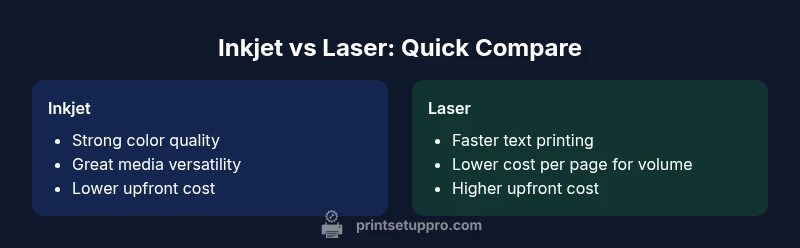
ink printer vs laser: for most households and small offices, laser printers deliver faster text printing and lower cost per page on long runs, while inkjet printers offer cheaper upfront prices and superior color quality for photos and graphics. The best choice depends on your print mix, with inkjets excelling in color-heavy tasks and lasers handling volume and durability.
What distinguishes inkjet and laser printers
In the ongoing ink printer vs laser debate, two fundamentally different printing technologies shape performance, cost, and practicality. Inkjet printers spray microscopic droplets of ink onto paper, delivering rich color and smooth gradients that excel for photos and graphics. Laser printers fuse toner with heat to produce sharp text quickly and reliably, especially on plain paper. Understanding these mechanisms helps you predict everyday experience, maintenance needs, and long-term expense. According to Print Setup Pro, the choice often hinges on your typical workload: color-heavy, image-rich documents favor inkjet, while high-volume, text-heavy printing favors laser. Both technologies have matured to handle a wide range of media, but the differences remain meaningful for decision-makers in home offices and small businesses.
Use-case alignments: when to pick inkjet vs laser
The best choice between ink printer vs laser often boils down to use-case realities. If your daily workflow includes abundant color photos, marketing materials, and graphic documents, an inkjet system tends to deliver superior color depth, subtle shading, and broader media support (including glossy photo paper). If your work mainly involves dense text, forms, and long runs of black-and-white documents, a laser option typically delivers higher speeds, more consistent results, and greater long-term efficiency. For students, a hybrid approach can work: inkjet for assignments with color elements and a compact laser for handouts and notes. Print Setup Pro observes that balancing color needs with volume helps narrow the choice to a single capable model rather than a broad category.
Cost dynamics and total cost of ownership
Total cost of ownership matters as much as the sticker price. Inkjet printers generally start with a lower upfront cost, but color ink cartridges can add up quickly when you print color-heavy documents or photos. Laser printers often require more upfront investment, yet their toner cartridges typically yield a higher page count and lower cost per page for high-volume black-and-white work. For color laser devices, cost per page can be competitive with inkjet when you run many pages, but initial costs and color cartridge expenses may swing ownership costs. Print Setup Pro emphasizes evaluating your typical job mix to estimate annual ink costs versus toner costs, as well as the frequency of cartridge replacements based on page volume.
Speed, quality, and media handling
Speed is a major differentiator: laser printers generally complete text pages faster than inkjets, which matters for busy offices and classrooms. Color quality is another key axis: inkjet printers usually outperform lasers for photos and vivid graphics because they place ink droplets with fine color granularity and can reproduce a broader color gamut. Media handling varies too: inkjets excel with glossy photo paper and a wide range of media thickness, while lasers often handle plain paper reliably and may be less forgiving with specialty media. In real-world terms, ink printers shine in color fidelity; lasers excel in speed and durability for large print runs.
Reliability, maintenance, and consumables
Reliability differs by use pattern. Inkjet heads and nozzles can clog if printers sit unused for extended periods, requiring nozzle checks and cleaning cycles. Lasers rely on toner and drums that generally require less frequent attention but can incur higher replacement costs when worn. For mixed environments with intermittent color jobs, you may see more maintenance routines on inkjets than on lasers. Print Setup Pro notes that regular use with a consistent print load helps minimize clogging and improve overall uptime for inkjet devices, while laser devices benefit from steady duty cycles and scheduled maintenance.
Environmental and energy considerations
Energy use varies across technologies, with laser printers often consuming more energy during operation but drawing less standby power in many models. Modern devices incorporate energy-saving modes and sleep timers to reduce idle consumption. If your workspace prioritizes sustainability, compare energy ratings and auto-off features across models. Additionally, printers with built-in duplexing can halve paper usage, benefiting both inkjet and laser configurations in long-term environmental and cost considerations.
Practical buying tips and scenarios
When choosing between ink printer vs laser, build a checklist based on your core needs: color quality, print speed, monthly page volume, and media variety. If you print a few color photos weekly and value print aesthetics, an inkjet with refillable cartridges or high-capacity inks could be your best bet. If you print long text reports, class handouts, or run dense black-and-white documents, a laser printer usually offers a smoother, cheaper path per page. Consider total cost of ownership (TCO) and not just the upfront price; factor in replacement cartridges or toner, maintenance, and reliability for your environment. Print Setup Pro recommends simulating a typical month of use to forecast annual costs and service needs.
Common myths debunked about ink vs laser printing
A common misconception is that inkjet printers are always poor for business use. While inkjets can require more cartridge changes with high color volume, some high-capacity ink models compete well on cost per page for color. Another myth is that laser printers can’t handle glossy photo media. In fact, many modern color laser printers support a range of media, though inkjets still hold the edge for photo-grade output. By focusing on your actual workload and print mix, you can separate myths from reality and pick a solution that aligns with your goals.
Color printing vs monochrome excellence: balancing expectations
Color needs aren’t universal. Inkjets naturally excel at color accuracy and gradient transitions, which matters for marketing materials and school projects. Lasers often outpace inkjets in producing crisp monochrome text with consistent density over large runs. If your documents are predominantly text with occasional color highlights, a color laser or a monochrome laser paired with a color inkjet for occasional color work could offer a practical compromise. The key is to map your typical print mix and weight it against price, reliability, and speed.
Setup tips for home offices and small teams
Even the best printer choice benefits from a thoughtful setup. Ensure drivers are up to date, connect over a reliable network, and enable appropriate duplexing to cut paper usage. For inkjets, run regular maintenance cycles and keep spare cartridges incompatible with the device away from heat and sunlight. For lasers, store toner and drums in a cool, dry place and follow calibration steps recommended by the manufacturer to preserve print quality. A well-configured device reduces downtime and supports consistent results.
Real-world workflows: example scenarios and expectations
Consider a small design studio that prints color proofs weekly and delivers large volumes of black-and-white client reports. An inkjet could handle color proofs with vivid gradients, while a color laser could efficiently produce monochrome client reports at scale. Another scenario is a student who needs high-quality photo prints for a project and also submits printed essays. A versatile approach may involve an inkjet for color projects and a compact monochrome laser for routine coursework. The key is balancing color priorities, speed needs, and monthly page volume.
Comparison
| Feature | Inkjet printer | Laser printer |
|---|---|---|
| Print speed | Slow to moderate for color-heavy pages | Fast, especially for text-only pages |
| Cost per page | Higher per-page color costs in many models | Lower per-page cost for black-and-white text; competitive for color in some cases |
| Upfront price | Typically lower initial cost | Typically higher initial investment |
| Color quality for photos | Excellent color quality and gradients for photos | Good color quality; best for text and business graphics |
| Media handling | Wide media support including glossy photo paper | Strong plain paper handling; some media support varies by model |
| Maintenance frequency | Prone to nozzle clogs if idle; requires occasional maintenance | Toner and drum maintenance; typically less frequent replacements |
| Ideal use-case | Color photos, graphics, and flexible media | High-volume text printing, durability, and speed |
Benefits
- Lower upfront cost for many inkjet models
- Excellent color accuracy and photo quality with inkjet
- Laser printers offer fast text print speeds and durable output
- Laser devices often have lower long-term maintenance needs for heavy workloads
Downsides
- Ink cartridges can dry out if not used regularly
- Inkjet color cost can be high with frequent color printing
- Laser printers may require higher initial investment and toner costs
Laser printers win for high-volume, text-heavy work; inkjet printers win for color quality and upfront affordability
Choose laser if your priority is speed and long-run cost efficiency for text. Choose inkjet if color quality and initial price are more important, especially for photos and graphics.
People Also Ask
What is the main difference between ink printer and laser printer?
The core difference is the printing method: inkjet printers deposit liquid ink onto paper for color accuracy and photo quality, while laser printers fuse toner with heat for fast text output and durable documents. Your choice should reflect your typical print workload and media needs.
The main difference is how they print: inkjets use liquid ink for color photos, lasers use toner for fast, durable text. Pick based on your usual print tasks.
Which printer is cheaper upfront?
Inkjet printers generally have a lower upfront price than color laser or monochrome laser devices. If your budget is tight and you don’t print large volumes immediately, an inkjet can be appealing.
Inkjets usually cost less to buy upfront, making them attractive for light or color-focused use.
Which printer has lower cost per page?
Laser printers typically offer lower cost per page for text-heavy documents, especially in high-volume environments. Color laser can be competitive in some cases, but pure text output usually benefits from laser.
For lots of plain text printing, lasers tend to be cheaper per page.
Are inkjet printers better for photos?
Yes, for color accuracy and photo quality, inkjets generally outperform lasers. They reproduce smooth gradients and vivid colors that are desirable for photos and marketing materials.
If you print lots of photos, an inkjet is usually the better choice.
Do color laser printers exist and are they good?
Color laser printers exist and are suited for office color graphics and charts. They deliver fast output and good color, though photo quality may not match high-end inkjets.
Color lasers are fast and good for color charts, but may not match inkjet photo quality.
What media can inkjet printers handle?
Inkjet printers support a wide range of media, including glossy photo paper, label sheets, and heavier stocks. Always verify media compatibility for your chosen model since some media types can affect print quality.
Inkjets can print on many paper types, including glossy photo stock.
Quick Summary
- Identify your typical print mix before choosing
- Laser = speed and durability; inkjet = color and media versatility
- Consider total cost of ownership, not just price
- Regular use reduces ink drying and maintenance issues
- Evaluate media types supported by each technology