Difference Between a Laser Printer and an Inkjet: A Comprehensive Comparison for 2026
Compare laser and inkjet printers across speed, cost, quality, media handling, and reliability. Learn which is best for text-heavy documents, color images, or mixed workloads in home offices and small businesses.


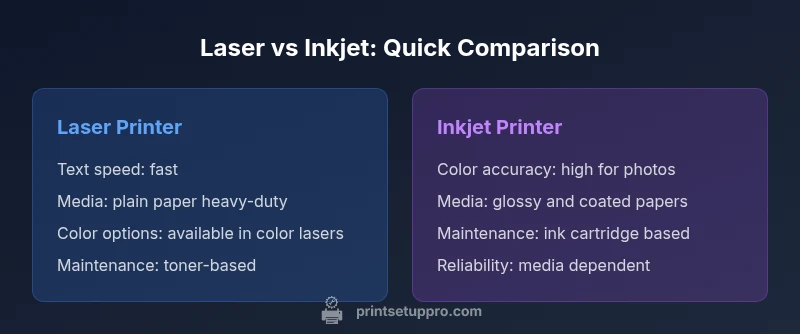
The quick answer to the difference between a laser printer and an inkjet is that lasers use toner for fast, high-volume text, while inkjets spray liquid ink for versatile color and photos. Print Setup Pro notes laser printers excel at cost-per-page for text; inkjets are favored for color accuracy and photo detail. See the full comparison.
What matters in choosing between printer technologies
In any office or home setup, the most meaningful questions are about workload, speed, cost, and print quality. According to Print Setup Pro, understanding the difference between a laser printer and an inkjet helps you map your needs to printer technology. A laser device uses dry toner and a rotating drum; an inkjet dispenses microscopic droplets of liquid ink onto media. This fundamental distinction drives performance characteristics that matter for documents, graphics, and photos. In this section, we’ll outline the decision factors you should weigh before committing to either technology, including typical use cases for home offices, students, and small businesses. The goal is to give you a clear framework to match your print goals with technical trade-offs.
Core technologies: how they work
The core difference is the imaging process. A laser printer uses a laser to charge a photosensitive drum, attracting toner particles that are transferred to paper and fused by heat. An inkjet printer propels tiny ink droplets through print heads, depositing pigment or dye directly on the surface of the paper. The result is a different optical behavior: toner yields crisp, dense text; ink creates smooth color blends and subtle graduations. Printing chemistry also shapes design choices: toner particles are dry, robust in dry environments, and long-lived on plain paper; inkjet inks can deliver richer color, smoother gradients, and better photo realism, especially on coated media. For most households and small offices, these distinctions translate into real-world tradeoffs between speed, noise, and finish. Print Setup Pro notes that the best choice aligns with your typical documents and images, your tolerance for maintenance, and your willingness to replace consumables less or more frequently.
Speed, duty cycle, and real-world performance
In practice, laser printers typically offer higher printing speed, especially for black text. They also generally have higher monthly duty cycles, making them better suited to sustained workloads. Inkjet printers may close the gap on color output with newer models, but the per-page cost and warmup time can influence throughput. Real-world tests show that simple text documents print quickly on most laser devices, while color graphics can take longer on many inkjets, depending on the media, print mode, and color management settings. For students printing essays or professionals producing drafts, speed can matter more than absolute color fidelity; for marketing materials, color accuracy and photo realism may take priority. Print Setup Pro’s analysis emphasizes evaluating your typical print mix: document sharing, drafts, color graphs, and photos—to determine which technology minimizes waiting time and maximizes productivity.
Text quality vs color and photo printing
Laser printers deliver sharp, consistent text with clean edges and high density. Inkjets excel at gradients, color depth, and photographic reproduction. For black-and-white business documents, laser text is usually crisper and more legible on plain paper. For color graphs and marketing collateral, inkjets tend to produce richer colors and smoother shading, especially on coated media. However, some high-end color lasers offer strong color blocks and improved grayscale, narrowing the gap. The choice depends on whether you value text clarity or image fidelity more, and on the media you routinely use.
Cost of ownership: consumables and maintenance
Consider the full cost: upfront price, toner or ink costs per page, maintenance frequency, and media costs. Laser printers often have a higher upfront price but lower per-page cost for black text; color laser printers raise the cost, but long-run efficiency can still favor laser for pure text output. Inkjet printers typically have cheaper initial price but higher ongoing ink costs, particularly for color and photo printing. Inkjet cartridges can dry out if not used regularly, requiring nozzle maintenance or replacement. Fewer wear parts in a monochrome laser may mean fewer maintenance visits; still, the fuser and drum components in a color laser can require replacements at higher intervals. Print Setup Pro recommends calculating total cost of ownership over 3-5 years based on your expected print volume and color needs.
Media handling and reliability
Laser printers are well-suited for plain office media: standard papers, envelopes, and labels. They tend to handle higher sheet input and more consistent feeding, which reduces jams in busy environments. Inkjet printers shine with a broader media range, including glossy photo paper, card stock, transparencies, and some fabrics in specialized setups. However, inkjets can be more sensitive to media quality and humidity; low-cost papers may produce feathering or color bleed. The reliability depends on build quality and usage patterns; Print Setup Pro notes that if you print on low-cost media infrequently, an inkjet may end up with clogged nozzles and wasted cartridges, whereas a heavily used laser will benefit from robust toner supply and fewer carriage movements.
Noise, footprint, and energy use
Generally, laser printers are louder when warming up and printing compared to compact inkjets, though modern models have reduced idle noise. They tend to be larger and heavier, which matters for small desks. Energy use varies: laser printers consume more energy during heating cycles, whereas inkjets consume less idle energy but sometimes require longer print times for large color jobs. For shared spaces, consider a laser's high-speed output against a quieter, more compact inkjet for occasional color work. In offices with strict noise policies or limited space, the form factor and energy profile should factor heavily into the decision.
Ink vs toner: chemistry, shelf life, and waste
Printer chemistry drives the life of consumables. Toner is dry powder, less prone to drying out than liquid ink; cartridges typically exist in high-capacity forms that reduce replacement frequency. Ink cartridges can dry out if not used regularly, requiring cleaning cycles that waste ink and time. Color management and printer maintenance can influence color stability over time. Recyclability and waste disposal have different implications for each technology; toners often require different recycling streams compared to ink cartridges. Print Setup Pro encourages users to consider environmental goals and local recycling options when choosing a printer type.
Color accuracy and media compatibility
Color reproduction quality depends on the printer's calibration, color profiles, and media. Inkjet printers generally offer superior photo realism on compatible media due to droplet size and pigment choices. High-end monochrome lasers can achieve excellent grayscale performance. However, color lasers can provide consistent color across a range of papers and controlled lighting. The decision should account for the color-critical tasks you perform, such as branding materials, slides, or photo proofs. Ensure you have proper color management, including ICC profiles and appropriate media settings.
Use-case scenarios: home office, student, small business
For a home office focused on document productivity, a monochrome laser might be the best fit, balancing cost and speed. Students who print assignments and color graphs may benefit from a color inkjet or a color laser depending on the required print quality. Small businesses producing sales collateral, reports, and marketing materials may require a color laser or a high-end inkjet with robust media handling. Print Setup Pro recommends mapping your typical print tasks and their frequency to decide whether laser or inkjet better aligns with your workflows.
Common myths and misconceptions
Myth: Laser printers can’t print high-quality photos. Reality: modern color lasers can achieve acceptable photos for some uses, but inkjets typically outshine in color photos. Myth: Inkjet printers are not suitable for office workloads. Reality: With proper paper and maintenance, inkjets can handle routine tasks. Myth: You must choose one technology and never mix. Reality: Some offices run both types to optimize color vs text outputs.
Practical decision framework: a quick checklist
Use this framework to decide between laser and inkjet without guesswork: (1) Identify your primary output (text vs color). (2) Consider space, noise, and energy constraints. (3) Estimate total cost of ownership over 3-5 years based on your print volume and color needs. (4) Test media compatibility with your most-used papers. (5) Factor future needs, such as potential photo printing or marketing materials. A structured decision matrix reduces ambiguity and helps you choose the right technology for your specific environment.
Comparison
| Feature | Laser Printer | Inkjet Printer |
|---|---|---|
| Text printing speed | fast | slower (varies by model) |
| Color printing speed | moderate to fast (color lasers vary by model) | fast on many models, but color throughput depends on media |
| Text quality | crisp, dense text | good to very good text, depending on model |
| Photo quality | adequate for basic documents; photos are not the primary strength | excellent color photos on high-end inkjets |
| Running cost (per page) | lower for black text on most lasers | higher per-page cost for color printing |
| Media handling | strong on plain office media | excellent on glossy and specialty media |
| Maintenance | toner cartridges and long life components | ink cartridges with nozzle maintenance and potential clogs |
| Reliability in busy environments | high due to robust duty cycles | depends on usage pattern; can be reliable with proper care |
Benefits
- Low long-term cost per page for text-heavy workloads
- Faster output for large document runs
- Strong paper handling and reliability in busy environments
- Longer lifespan for routine document printing and minimal maintenance
Downsides
- Color photo quality is typically better with inkjet
- Inkjet cartridges can dry out if not used regularly
- Color lasers can have higher upfront costs and consumable expenses
Laser printers excel for high-volume text; inkjets excel for color and photos
If your workload is document-heavy, choose a laser. If color accuracy and photo detail matter, choose an inkjet. For mixed tasks, consider a hybrid setup or a clear workflow split.
People Also Ask
Which printer is faster for text documents?
In most cases, a laser printer will print text faster than an equivalent inkjet, especially for large volumes of black-and-white pages. Differences can vary by model and firmware, but the general trend holds for office workloads.
For text-heavy work, lasers are usually faster and more reliable than inkjets.
Are laser printers good for photos?
Laser printers can produce acceptable photos for emergency or basic color needs, but inkjets typically deliver superior color accuracy and smoother gradients for photography. If photos are central, an inkjet is usually the better choice.
Photos look best on inkjets, though some color lasers are capable of decent color prints.
Is it cheaper to buy an inkjet or a laser printer upfront?
Upfront costs vary by model, but many inkjets are cheaper to buy initially, while laser printers may cost more at purchase but offer lower running costs for text-heavy work over time.
Inkjets are cheaper upfront; lasers save more on ongoing text printing.
Can I use the same paper for laser and inkjet printers?
You can use many standard papers in both, but media compatibility matters. Inkjets can require higher-quality coated papers for best color, while lasers work well with plain office stock. Always check media compatibility in the printer manual.
Check the media specs for each printer to avoid issues like bleed or jams.
Do color lasers exist, and are they worth it?
Color lasers exist and are useful for high-volume color documents, but they often come with higher upfront costs and consumable needs. If you do a lot of color work with text-heavy materials, they can be cost-effective in the long run.
Color lasers exist and can be cost-effective for big color jobs, but they’re not universal.
Is maintenance higher for inkjets than lasers?
Inkjet printers can require more frequent maintenance due to nozzle cleanings and potential ink drying, especially if printing infrequently. Lasers tend to have fewer maintenance events related to printheads but require toner replacements and periodic drum/fuser checks.
Inkjets need occasional nozzle care; lasers mainly need toner management.
Quick Summary
- Identify your primary print tasks before choosing
- Laser is superior for speed and text durability
- Inkjet delivers richer color and photo quality
- Calculate 3-5 year total cost of ownership
- Assess space, noise, and media needs