Difference Between Printer and Laser Printer: A Practical Guide
Learn the difference between printer and laser printer, covering speed, print quality, cost per page, and best-use scenarios to help home offices and students pick the right device.


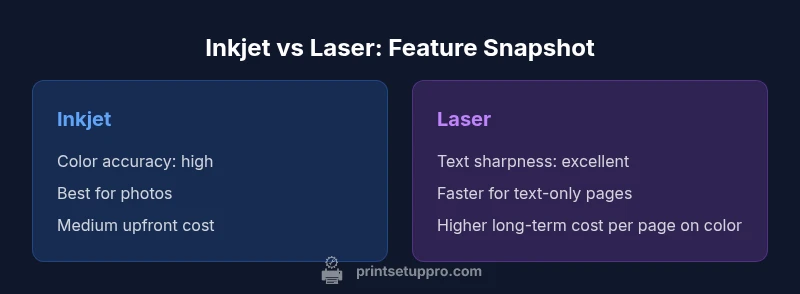
The difference between printer and laser printer centers on how each device creates marks on paper: inkjet sprays liquid ink, while laser printers fuse toner with heat. For most everyday workloads, a laser printer delivers faster text output and lower long-run costs, whereas an inkjet printer excels in color accuracy and photo quality. If you print mainly documents, laser wins; if color graphics or photos are frequent, an inkjet or a versatile all-in-one may be better. See our detailed comparison for specifics.
Core technology and impact on outcomes
Printers operate on two foundational technologies: inkjet and laser. Inkjet printers spray tiny droplets of liquid ink through fine nozzles onto paper, delivering broad color ranges and smooth gradients. Laser printers, by contrast, use a charged drum to attract dry toner particles, which are fused to the page with heat. This fundamental difference drives downstream realities: cost per page, maintenance needs, media compatibility, and even reliability under heavy use. When people ask about the difference between printer and laser printer, they are really comparing two design philosophies with distinct strengths. Inkjet devices excel at color accuracy and photo realism, but laser hardware tends to deliver crisper black text, faster output, and stronger durability for high-volume, text-heavy tasks. For most home offices and classrooms, the choice comes down to workload, color requirements, and total ownership cost over time. According to Print Setup Pro, a rigorous evaluation of typical workloads reveals that laser printers shine in document-centric environments, while inkjets maintain an edge for vibrant color graphics.
Print quality and color capabilities
Print quality is the most tangible difference between printer and laser printer. Inkjet devices produce rich color gradients and subtle tonal shifts ideal for photos and graphics, thanks to liquid ink that blends on the page. Laser printers, meanwhile, typically render text with sharper edges and high-contrast characters, which makes documents look consistently clean at any font size. Color laser printers exist, but they generally do not match the photo realism of high-end inkjets. If your primary task involves charts, graphs, or marketing collateral with vivid color, an inkjet or a hybrid device often performs best. For heavy text printing and business reports, a laser printer tends to deliver quicker results with steadier output. The Print Setup Pro team emphasizes that the right choice hinges on your content mix, not just the headline specs.
Speed, efficiency, and duty cycle considerations
Speed matters when you print large volumes of text or run late-night print jobs. Laser printers typically outperform inkjets in black-and-white text speed and maintain steady throughput under continuous operation. Inkjet printers can slow down when producing dense color pages, and long color-print runs may require more frequent cartridge changes. Duty cycle—how many pages a printer can handle monthly—also tends to favor laser devices for offices with high document workloads. However, modern inkjets have narrowed the gap for colorful, mixed-media tasks. The practical takeaway is to match your expected monthly load to the device’s intended use-case profile, rather than relying on peak speed alone. Print Setup Pro notes that understanding your typical page mix is key to choosing the most economical solution over three to five years.
Cost structure: upfront price and ongoing costs
Upfront cost often plays a big role in initial decisions. Inkjet printers generally have lower entry prices, which appeals to students and hobbyists. Long-term ownership costs hinge on consumables: ink cartridges can become expensive if you print heavily with color. Laser printers typically cost more upfront but offer lower cost per page for monochrome printing due to toner efficiency and higher page yields. Color laser printers exist, but the cost per page for color output remains higher than black-and-white laser or most inkjets. When evaluating total cost, calculate estimated pages per month, color versus black-and-white printing, and replacement frequency. Print Setup Pro’s framework favors devices whose ink/toner replacement cycles align with your actual usage to minimize waste and downtime.
Media handling and paper compatibility
Media handling varies notably between printer and laser printer. Inkjet devices tend to be more forgiving with a broader range of media types, including glossy photo papers and thin stock, which makes them popular for brochures and creative projects. Laser printers often tolerate regular office paper excellently but can struggle with very thin or specialty media that warp from heat. Heavy stock and specialized coatings may require a laser printer with a robust fusing system, or an inkjet configured for heavier media. Always verify napkin-weight papers, glossy stock, and envelope compatibility against the printer’s media specifications. Addressing these compatibility questions early helps prevent jams and misfeeds.
Connectivity and software ecosystem
Modern printers emphasize wireless connectivity, mobile printing, and cloud-based workflows. Laser printers often excel in networked office setups with reliable driver support and centralized management features. Inkjet printers offer strong consumer-oriented apps and drivers that simplify color management for photos and presentations. When choosing, assess whether you need AirPrint/Google Cloud Print compatibility, driver stability, and compatibility with your operating system. A smooth software experience reduces downtime and helps you realize the full potential of either technology. Print Setup Pro underscores that a strong software foundation is as important as hardware performance for long-term satisfaction.
Longevity, reliability, and maintenance tasks
Toner in laser printers generally lasts longer than ink cartridges, and the drum unit can provide consistent quality over many thousands of pages. Inkjet heads, while precise, can be more susceptible to clogging if the printer is left idle for extended periods or if maintenance cycles are skipped. Regular maintenance tasks—such as cleaning print heads on inkjets and replacing toner or drums on lasers—affect reliability and total cost of ownership. For households or offices that print sporadically, an inkjet with moderate maintenance may be more cost-effective; for high-volume environments, a laser printer minimizes downtime and often reduces the frequency of cartridge replacements.
Environmental impact and energy considerations
Both technologies have environmental trade-offs. Inkjet printers use more frequent cartridge replacements for color output, contributing to plastic waste unless cartridges are recycled. Laser printers benefit from lower energy consumption per page for monochrome output but require heat to fuse toner, which can influence energy use during long print runs. If sustainability is a priority, consider devices with energy-saving modes and refillable or remanufacturable consumables. Print Setup Pro recommends evaluating standby power, auto-off features, and available recycling programs as part of a holistic environmental assessment.
Practical buying framework: who should buy what, and when
The decision between inkjet and laser printer hinges on use-case priorities. If your workload is predominantly text with occasional color charts, a monochrome laser printer offers speed and efficiency advantages. If you print high-volume color graphics, marketing materials, or photos, an inkjet printer or a color-capable hybrid may be more suitable. Budget constraints, media needs, and the desire for a compact home office setup also influence the choice. Create a checklist of priority tasks, expected monthly pages, color requirements, and space limitations, then evaluate devices against that list. Print Setup Pro’s practical approach emphasizes alignments between needs, capabilities, and total cost of ownership.
Setup tips for new buyers: getting started smoothly
When you unbox a printer, install the correct drivers for your operating system, and connect to your network, you set the foundation for reliable performance. For inkjets, run a few test color pages to prime the cartridges and verify color accuracy. For laser printers, run calibration routines to ensure consistent text quality across pages. Register the device for firmware updates and warranty coverage, and set up energy-saving modes to minimize power use. Maintaining a regular cleaning schedule and checking for firmware updates helps preserve print quality, reduces jams, and extends the life of the machine.
Common myths and misconceptions
Myths about printers often center on speed, cost, and color capability. A frequent belief is that all inkjets are inferior for text, which misses the advances in color management and photo printing offered by newer models. Another misperception is that laser printers are only suitable for monochrome documents; in reality, several laser models can produce color outputs with reasonable quality, though at a higher cost per page. Lastly, some buyers assume that cheaper machines are always better; however, long-term costs, reliability, and maintenance should drive value. Debunking these myths requires a careful evaluation of your specific needs and a fair test of devices under typical workloads.
Scenarios and buyer checklist: quick-reference guidance
For a student on a tight budget who mainly prints assignments, a compact inkjet with affordable color will serve well, provided color accuracy is not critical every day. For a small home office with consistent black-and-white reports and frequent printing, a monochrome laser printer minimizes time, effort, and ink consumption. For a small business that requires color marketing materials and staples like receipts, a color laser printer or a high-quality inkjet hybrid may be most appropriate. Use the buyer checklist to compare page yields, media handling, connectivity, and total cost of ownership for each scenario.
Comparison
| Feature | Inkjet printer | Laser printer |
|---|---|---|
| Print quality (text) | Good to excellent | Excellent |
| Print quality (color/photos) | Excellent color realism | Good but less natural photo output |
| Speed (text) | Moderate to fast, depends on model | Very fast for text-heavy jobs |
| Cost per page (black/white) | Higher with frequent color use | Lower for monochrome printing |
| Upfront price | Typically lower entry price | Typically higher upfront cost |
| Media handling | Broad media compatibility incl. glossy media | Excellent plain paper handling; heavier media possible in some models |
| Reliability and maintenance | Prone to clogs with idle periods (some models) | Toner cartridges and drums require less frequent attention |
| Best for | Color-rich photos and casual color work | High-volume text and business documents |
Benefits
- Inkjet: Superior color accuracy and photo quality
- Laser printer: Faster text printing and lower page costs for black-and-white work
- Inkjet: Lower upfront cost for entry-level models
- Laser printer: Strong durability for high-volume document printing
Downsides
- Inkjet: Higher color ink cost per page and potential clogs with idle time
- Laser printer: Higher initial purchase price and potential color cost premium
- Inkjet: Color output can fade with prolonged exposure to light if not properly treated
- Laser printer: Heat can limit media compatibility with some thin papers
Laser printers usually win for high-volume text; inkjets win for color and photos
Choose laser for speed and cost efficiency on text-heavy tasks. Choose inkjet for vibrant color photos and flexible media support. For mixed needs, consider a model that balances both strengths.
People Also Ask
What is the main difference between inkjet and laser printers?
Inkjet printers use liquid ink sprayed onto paper, ideal for photos and color, while laser printers fuse toner with heat for fast text and durability. The main difference is how each technology creates marks on the page and how this affects cost, speed, and output quality.
Inkjet uses liquid ink and is great for color photos; laser uses toner and is faster for text. The choice hinges on what you print most.
Is cost per page higher with inkjet printers?
Yes, inkjet color pages generally cost more per page than laser text pages due to cartridge prices and ink usage. For monochrome printing, laser printers usually offer a lower ongoing cost per page.
Inkjets cost more per page for color; lasers save on black-and-white pages over time.
Are laser printers better for high-volume text printing?
For high-volume text printing, laser printers typically deliver faster throughput and lower downtime between prints. They are designed to handle continuous workloads with steadier performance.
Yes. Laser printers handle large volumes of text quickly with less maintenance.
Do inkjet printers print photos better than laser printers?
Generally yes. Inkjet printers are known for superior color accuracy and photo realism, making them a preferred choice for photo-heavy projects and graphics.
Inkjets usually produce better photos and color graphics than lasers.
Can color laser printers replace inkjets for photo work?
Color laser printers can produce acceptable color documents, but they typically don’t match the photo realism and subtle color graduations of high-end inkjets. They are best for color documents and graphics rather than photography.
Color lasers aren’t ideal for photo-perfect prints; inkjets win there.
Quick Summary
- Laser is typically better for speed and black-and-white cost per page
- Inkjet excels at color accuracy and photo quality
- Assess monthly page volume and color needs before buying
- Check media support and driver compatibility for long-term use