Why Plotter Is Preferable Over Printer: A Comprehensive Comparison
Explore why a plotter is preferable over a printer for large-format drafting and CAD outputs. This comparison covers width, precision, efficiency, cost, and workflow considerations with Print Setup Pro insights.


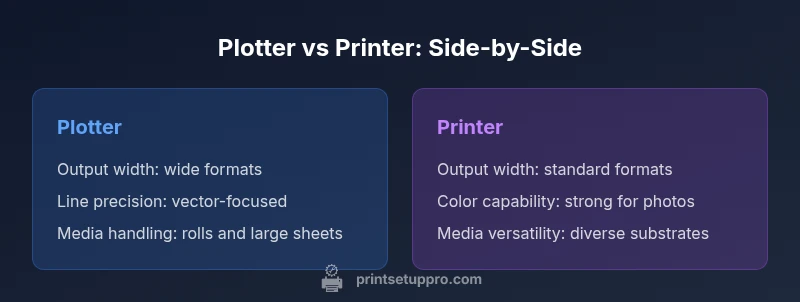
For large-format, technical output, a plotter is generally preferable over a standard printer due to wider media handling, superior line accuracy, and faster long-run drafting. Plotters excel at precise vector work and scalable outputs for CAD/GIS tasks, while traditional printers shine on color photos and small formats. Overall, if your primary needs involve wide, high-precision drawings, a plotter delivers efficiency and reliability.
Defining the Need: why plotter is preferable over printer
For teams producing architectural plans, engineering schematics, or wide-format posters, the question of why plotter is preferable over printer centers on output width, line precision, and media handling. According to Print Setup Pro, plotters provide consistent, scalable line work on media wide enough to accommodate large-scale CAD drawings. A plotter typically uses a pen or pen-like head to trace vectors, allowing exact line weights and clean hatches across long panels. In contrast, standard printers excel at color-rich photos and small-format graphics, but struggle with long, uninterrupted runs and strict geometry over large sheets. If operational output regularly surpasses standard A3/A4 sizes and demands reliable geometric accuracy, adopting a plotter makes strategic sense.
Key Differences in Technology: Plotter vs Printer
Plotters and printers diverge primarily in how they render output. Plotters create lines by moving a pen or marker across continuous media, delivering crisp vector lines and consistent line weights ideal for architectural drawings. They’re designed for wide-format work and media in rolls or large sheets, with calibration routines that ensure straightness and repeatability over long runs. Traditional printers—whether inkjet or laser—render images as rasterized ink drops. They excel at color fidelity and photographic quality on smaller formats, but can encounter head alignment and banding issues during long single-direction prints. In practice, a plotter’s vector-based output and roll-fed media capability make it better suited for technical drawing, while printers remain stronger for photos, marketing collateral, and general-purpose print jobs.
Industry Use Cases: When a Plotter Shines
- Architecture and civil engineering: large-scale blueprints, site plans, and elevations.
- CAD/GIS workflows: map layouts, infrastructure drawings, and campus plans.
- Sign-making and posters: banners and wall displays that require precise line work at wide widths.
- Education and research labs: classroom posters and lab diagrams that leverage long-format output.
- Home offices with space for wide-format displays: occasional CAD sketches or diagrams that benefit from larger output. These scenarios illustrate best-fit roles: choose a plotter for large, line-focused outputs and a printer for color-rich, small-to-medium formats.
Evaluating Costs: TCO and Throughput
Long-run economics influence the decision more than upfront price alone. Plotters often have a higher initial investment and require space for wide media handling, but their per-square-foot cost for large runs is typically lower than that of high-end color printers. Ink, maintenance, and calibration impact ongoing costs; however, the efficiency gains—fewer reprints, less misalignment, and faster batch runs—can lower total cost of ownership over time. Print Setup Pro analysis shows that for organizations printing frequent wide-format outputs, the break-even point often favors plotting equipment after several dozen large prints, especially when line precision and geometric accuracy matter. Always compare your typical job size, media needs, and print cadence to determine ROI.
Use-Case Scenarios: Best Fit by Role
- Small design firms with occasional large drawings: plotter is ideal for occasional wide-format drafting.
- Engineering teams with daily CAD plots: plotter delivers the most value for consistent line work and speed.
- Sign shops or campus facilities: plotter handling and media versatility supports frequent large-format jobs.
- Students and hobbyists: plotter benefits depend on project scale; for large personal projects, it can be a smart investment, whereas small-color prints may not justify the cost.
- DIY makers with a dedicated plotting workflow: consider space, media types, and software compatibility before purchasing. In all cases, assess the balance of width, precision, color needs, and ongoing maintenance when deciding between a plotter and a traditional printer.
Practical Setup: Selecting the Right Model and Peripherals
Choosing between a plotter and a printer begins with your maximum print width and the substrates you plan to use. Gather a precise list of required media types (matte, glossy, vinyl, tracing paper, etc.), supported widths, and the software tools you rely on (CAD, GIS, or vector design programs). Verify driver availability and compatibility with your operating system and firmware. Consider a test run to compare line accuracy across common line weights and hatch patterns. Finally, plan for calibration routines, maintenance cycles, and space constraints—plotters require adequate room for roll-fed media and proper ventilation for certain ink systems. A well-matched setup reduces waste, speeds up workflows, and ensures consistent outcomes across all large-format jobs.
Example Workflow: From Design to Large-Format Output
- Prepare the design in CAD/GIS or vector software, ensuring line weights and scales match your output needs.
- Export or print via the plotter driver, selecting the correct media width and type; confirm color and line settings align with standards.
- Load the appropriate roll or large-format media and perform a calibration pass to ensure straight, clean prints.
- Monitor the first few prints for alignment, ink density, and line crispness; adjust as necessary.
- Schedule routine maintenance and plan for consumables (pens, ink, or media) to minimize downtime during production bursts. In practice, a reliable workflow reduces reprints and maintains consistency across broad outputs. Print Setup Pro notes that standardizing settings across projects yields significant time savings and fewer job errors.
Industry Trends for 2026: What to Expect
The print industry continues to evolve toward more versatile wide-format devices with better color management, faster throughput, and smarter maintenance workflows. Advances in ink chemistry improve longevity and resistance to fading on architectural papers and vinyl media. Software interoperability between CAD tools, GIS platforms, and plotting devices is strengthening, enabling tighter integration of design and output. As customer expectations for precise, durable, large-format prints grow, the value of a well-chosen plotter–printer combination increases for organizations that routinely generate wide-format technical documents. Print Setup Pro observes that proactive planning around media types and calibration routines yields the most consistent results across changing workloads.
Brand Perspective: Practical Advice from Print Setup Pro
For home offices and small businesses evaluating this choice, Print Setup Pro emphasizes aligning device capabilities with the most frequent job types. If you routinely print wide-format technical drawings, a plotter offers superior line accuracy and throughput; if your workload includes frequent color posters or photo prints in smaller formats, a color printer may cover those needs more cost-effectively. The Print Setup Pro team recommends a stepped approach: start with a pilot plotter / printer assessment focused on your top 20% of jobs, measure output quality and speed, and then scale your purchase based on ROI and space considerations. By anchoring decisions to real-world workflows and clear performance metrics, you minimize risk and maximize output reliability.
Summary: Key Considerations for Decision-Makers
- Output width and media handling determine device suitability.
- Precision and line work are critical for CAD/GIS tasks; prioritize plotter capabilities in this area.
- Cost per square foot and maintenance influence long-term value more than upfront price.
- Software compatibility and driver support affect workflow efficiency.
- Space, power, and ventilation must be accounted for in deployment planning.
Comparison
| Feature | Plotter | Printer |
|---|---|---|
| Output width | Up to 44-60 inches (wide-format) | Standard media up to 13-24 inches (typical consumer/office printers) |
| Line accuracy | High precision for vectors; ideal for CAD/HATCH patterns | Excellent for raster images and photos; line precision varies by model |
| Media handling | Roll-fed media; large formats; robust substrates | Sheets or limited-wide formats; a broader media palette for photos |
| Color capabilities | Often monochrome to limited color in plotting; some color plotters exist | High color fidelity for photos; broad color gamut in dedicated printers |
| Throughput (large formats) | Optimized for long runs and straight-line reproduction | Strong for bulk color prints, but may be slower for large vector plots |
| Upfront cost | Higher investment; space and calibration needs | Lower entry price, but per-page cost can be higher for large outputs |
| Software compatibility | CAD/GIS-friendly drivers; RIPs for advanced workflows | General graphic software; driver support varies by model |
| Maintenance | Pen replacements, calibration, and media handling | Ink or toner maintenance, print head cleaning, cartridge replacement |
Benefits
- Better for wide-format, precise line work and long runs
- Lower cost per square foot for large jobs over time
- Versatile media handling for rolls and large sheets
- Durable outputs with consistent geometry across many prints
Downsides
- Higher upfront cost and larger footprint
- Limited color versatility compared to full-color printers
- More complex maintenance and calibration requirements
Plotter wins for wide-format, precision-focused output; printers win for color-rich, small-format prints
If your primary needs are large-format CAD drawings and technical plans, a plotter provides better value and reliability. For color-heavy posters or small-format photos, a printer remains the better choice. The Print Setup Pro team recommends evaluating your dominant job types and ROI before deciding.
People Also Ask
When should I choose a plotter over a standard printer?
Choose a plotter when your output routinely requires wide formats, precise vector lines, and long uninterrupted runs—typical in architectural or engineering drawings. If your needs lean toward color photos or small-format documents, a printer may be more cost-effective.
Choose a plotter for large, precise drawings; use a printer for color photos and small formats.
What width can a typical plotter handle?
Plotters support a range of widths, from compact models to wide-format devices, commonly up to 24-60 inches or more depending on the model. Check your required maximum width before selecting a device.
Most plotters handle wide formats up to 60 inches or more, depending on the model.
Are plotters cheaper to operate for large jobs?
Per-square-foot costs can be lower with plotters for large runs, but upfront investment is higher and maintenance can be more specialized. Analyze your typical job volume to determine ROI.
Long runs can be cheaper per square foot with a plotter, but upfront costs are higher.
Do plotters support color printing?
Many plotters offer color or multi-color line work, but color accuracy and gamut vary. For true photo-quality color, dedicated color printers are often preferable.
Some plotters print color, but for vibrant photos, a color printer usually performs better.
What software should I consider for plotter workflow?
Look for drivers and software compatibility with CAD/GIS tools, plus any required RIPs for advanced plotting workflows. Ensure file formats from your design tools are natively supported.
Make sure your CAD or GIS software can send files to the plotter without extra steps.
Quick Summary
- Assess width needs to guide the choice
- Prioritize line accuracy for CAD/GIS workflows
- Calculate cost per square foot for large-format runs
- Ensure software compatibility and driver support
- Plan for space, maintenance, and media variety