3d Printer for Action Figures: A Practical Guide
A comprehensive, step-by-step guide to choosing, setting up, and finishing 3d printed action figures, from printer types to painting and display-ready finishes.


You’ll learn how to select a 3d printer for action figures, optimize settings for durable, highly detailed figurines, and perform safe post-processing. This quick guide covers printer types, material choices, basic maintenance, and a practical setup path. By following these steps, you’ll be able to produce customized figures ready for painting, posing, and display.
Why a purpose-built 3d printer matters for action figures
For hobbyists and small studios, the decision to invest in a dedicated print setup can determine whether a project becomes a shelf-worthy figure or a fragile curiosity. According to Print Setup Pro, the right printer and workflow dramatically affect scale accuracy, surface detail, and joint durability when producing action figures. The Print Setup Pro team found that resin-based workflows often deliver crisper features for facial expressions and tiny accessories, but require more post-processing and safety considerations. Conversely, FDM systems excel at larger parts, faster turnarounds, and lower material costs, though achieving fine miniatures demands careful calibration and clever part orientation. In this guide, we balance these realities and show how to tailor your toolset to different figure sizes, from 1:12 to 1:6 scale, while keeping the process approachable for beginners and scalable for hobbyists who want to build a small catalog of characters.
Printer types: FDM vs SLA for action figures
FDM printers are typically more affordable and easier to maintain, making them a solid choice for beginners and larger parts or prototypes. SLA (resin) printers deliver finer details ideal for facial expressions, small accessories, and thin limbs, which are common in action figures. When selecting, consider build volume, corner resolution, and post-processing requirements. A practical approach is to start with a capable FDM printer for bodies and use an SLA workflow for heads, hands, and intricate accessories to achieve crisp details without breaking the budget. The balance between speed, cost, and finish quality will guide your initial investment and future upgrades.
Materials and finishes: choosing the right filament or resin
Material choice directly impacts durability, weight, and finish. For FDM: PLA is beginner-friendly and prints cleanly with decent detail; PETG offers higher impact resistance; ABS/ASA provides better heat resistance but requires enclosure and odor management. For resin workflows: standard resins yield fine details but can be brittle; tough resins improve impact resistance; flexible resins are useful for joint parts or accessories that need slight give. Post-processing matters as much as material: curing or annealing can boost rigidity and dimensional stability, while proper painting and sealing protect surfaces from chips and wear.
Print settings that matter: resolution, supports, and orientation
Detail and strength hinge on a few levers. For resin, aim for layer heights around 0.05–0.12 mm to capture fine facial features; for FDM, 0.08–0.16 mm balances surface smoothness and print time. Increase wall thickness and set a reasonable infill to ensure joint stability (15–25% is a common starting point for figures with articulated limbs). Supports should be tuned to minimize post-processing damage; consider breakaway supports and test angles to avoid visible layer lines on prominent surfaces. Orientation can dramatically affect surface finish and the amount of support material used.
Slicing workflow and model preparation
Start with clean, manifold models and verify scale accuracy before slicing. Print multiple figures efficiently by arranging items to maximize bed usage and minimize supports. For articulated figures, design joints with appropriate tolerances and consider printing key components separately for easier assembly and better paint adhesion. In your slicer, enable separate color channels or material assignments if supported, and preview supports and layer previews to catch collision or overhang issues early.
Post-processing and painting prep
Post-processing differentiates a museum-quality figure from a good-enough print. Resin prints require careful washing, post-curing, and support removal to avoid micro-cracks; FDM parts benefit from sanding and priming. Start with gentle sanding (200–400 grit) to reduce layer lines, then progress to finer grits (600–1000) for a smooth surface. Apply a plastic-friendly primer in light, even coats, then build color with thin layers of acrylic paints. Seal with a clear coat to protect details from chipping during handling and posing.
Common pitfalls and troubleshooting
Adhesion failures and warped parts are common for beginners. Calibrate bed leveling, temperature, and first-layer height. Resin workflows demand proper ventilation and skin protection; always wear gloves and work in a well-ventilated space. If joints bind or prints crack, revisit CAD tolerances or adjust exposure times in your printer profile. Keeping a log of print profiles for different scales helps you reuse successful settings and speed up future projects.
Practical workflow: from model to display
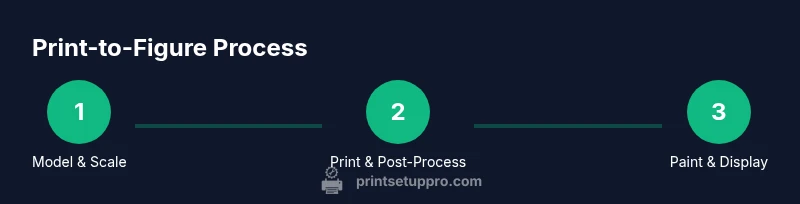
Begin with a concept, then source or create a compatible 3D model and scale it for your target figure size. Print a test limb or accessory first to verify fit and balance. Post-process, assemble, and prime with a consistent technique. Finally, paint in layers and apply finishing coats to simulate texture (metallics, plastics, weathering). A repeatable workflow reduces rework and accelerates production of a small line of characters.
Authority sources and further reading
For standards and best practices, consult established resources from reputable sources. MIT OpenCourseWare offers courses and tutorials on 3D printing concepts and design for manufacturability. The U.S. National Institute of Standards and Technology provides context on materials and process controls relevant to hobbyist 3D printing. For practical product and patent considerations, the United States Patent and Trademark Office offers guidelines and case summaries related to 3D printing inventions.
Tools & Materials
- 3D printer (FDM or SLA)(Choose a printer with at least 0.05–0.1 mm layer height capability for fine details.)
- Material (PLA, PETG, or resin)(Select based on printer type and desired strength/detail.)
- Slicer software (e.g., Cura, ChiTuBox)(Have profiles ready for your chosen materials; support settings vary by material.)
- Bed adhesion aids(Blue painter’s tape, glue stick, PEI sheet, or build surfaces depending on material.)
- Post-processing tools(Isopropyl alcohol, soft brushes, dental picks, tiny files.)
- Safety gear(Gloves, eye protection, and a respirator or well-ventilated area for resin work.)
- Primers and paints(Acrylic primers and hobby paints; use thin coats for best results.)
- Finishing and sealing(Clear coats or varnishes to protect painted surfaces.)
Steps
Estimated time: 6-12 hours
- 1
Prepare models and set scale
Import or design the figure model, verify manifold geometry, and scale to your target size (e.g., 1:12). Check joint tolerances and decide whether to print as a single piece or in sub-assemblies for easier finishing and painting.
Tip: Test fit a small prototype limb to confirm clearance and joint range before committing to a full print. - 2
Configure printer and slicer settings
Choose the appropriate material and layer height; set supports to minimize touchpoints on visible surfaces. For resin, adjust exposure and layer height; for FDM, optimize wall thickness and infill for strength without excessive weight.
Tip: Run a 20–40 minute test print of a single limb to validate fit and surface quality. - 3
Start print and monitor first layer
Level the bed, clamp the model securely, and observe the first layer for good adhesion. Check for warping or curling and pause if necessary to adjust nozzle height or bed temperature.
Tip: A good first layer is the foundation of a successful print—invest time here. - 4
Post-process the print
Remove supports carefully, sand rough areas, and wash resin prints before post-curing. For FDM, remove supports and smooth layer lines with progressively finer sandpaper.
Tip: Wearing PPE during resin post-processing reduces exposure to hazardous chemicals. - 5
Paint and seal the figure
Apply primer, build color with thin layers, and seal with a clear coat to protect details. Consider weathering effects for realism and airbrushing for even coverage.
Tip: Test color swatches on a spare part to ensure color accuracy before final painting.
People Also Ask
What printer type is best for action figures?
There isn’t a single best choice; many hobbyists start with FDM for bodies and resin for detailed parts to balance cost and quality. Your decision depends on budget, required detail, and tolerance for post-processing.
For action figures, many hobbyists begin with FDM for bodies and resin for fine parts to balance cost and detail.
Do I need resin printing to get good detail?
Resin printing offers crisper details on faces and small accessories, which are common in action figures. If you only have an FDM printer, you can still achieve good results with careful tuning and post-processing.
Resin printing gives crisper detail, but you can still get good results with a well-tuned FDM setup.
How long does it take to print a single figure?
Print times vary by size, material, and printer speed. A common action figure print can take several hours per piece, with resin prints often shorter per layer but longer post-processing.
Print times vary; expect several hours per figure, plus post-processing time.
What safety steps are essential for resin printing?
Work in a ventilated area, wear gloves and eye protection, and cure resin prints in a well-ventilated space away from children or pets. Cleaning should be done with approved solvents and disposed of properly.
Ventilation, gloves, and eye protection are essential whenever handling resin prints.
Can I assemble figures after painting?
Yes. Plan joints and tolerances so assembly does not damage paint. Use clear or compatible adhesives and allow sufficient curing time before posing.
Yes, plan joints to avoid scratching paint during assembly.
What maintenance does a 3d printer for action figures require?
Regular bed leveling, nozzle or laser alignment checks, and periodic cleaning of the build surface extend print quality. For resin printers, clean resin tanks and replace filters as recommended by the manufacturer.
Regular calibration and cleaning keep prints consistent; follow manufacturer guidance for resin tanks.
Watch Video
Quick Summary
- Choose resin for fine details, and FDM for larger bodies.
- Calibrate and test prints before committing to full runs.
- Post-processing quality drives durability and paint adhesion.
- Document workflow to build a repeatable process.
- Respect safety when working with resins and solvents.