3D Printer Near Me: Find Local Options & Setups
Learn how to locate a 3D printer near you, compare local access points, and prepare your files for quick, reliable prototyping with Print Setup Pro guidance.


To locate a 3D printer near you, start with local makerspaces, libraries, and print shops. Use maps and community directories to identify options within 10–20 miles, then compare hours, pricing, and supported materials. Prioritize proximity to reduce wait times and simplify pickup for fast prototyping. Consider whether the service allows bringing your own filament and whether they provide post-processing.
How to locate a 3D printer near you
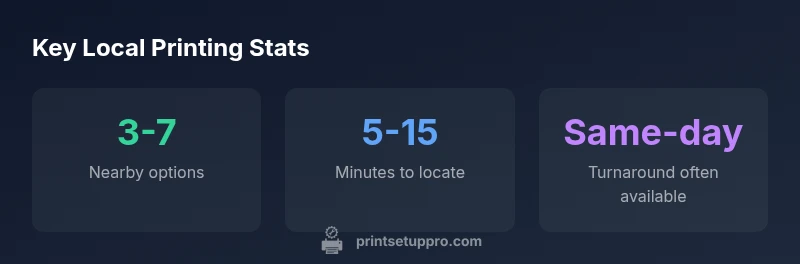
If you’re starting from scratch, the quickest path is to map your local ecosystem of 3D printing services and plan a short route, not a long remote order. According to Print Setup Pro, proximity matters as much as price, because a nearby device reduces travel time and simplifies file handoffs. Start with a conservative radius (5–20 minutes or roughly 5–10 miles for urban areas) and expand as needed. Use a mix of sources: maps, community directories, social media groups, and local business listings. In practice, you should search for three categories: (1) makerspaces that offer open access to printers, (2) public libraries with 3D print services, and (3) local print shops or design studios that run on-demand prints. Document each option’s hours, reservation policy, and material support. If you need specialized equipment (large build volume, resin printers, or multi-material setups), explicitly filter results to those capabilities. Plan a short visit to at least two options to gauge print quality, process transparency, and staff responsiveness.
Additionally, the first wave of decisions should consider the logistics of pickup or delivery, and whether you’ll require a consistent supplier for filament and accessories. The goal is to minimize idle time between file preparation and final part in hand, while preserving control over print quality. Load your test model and verify that the printer’s nozzle size, bed leveling, and material handling meet your project’s requirements.
Local access points: makerspaces, libraries, and shops
Local access points for 3D printing come in several flavors, each with distinct benefits and constraints. Makerspaces typically offer open access, early-stage prototyping support, and community mentorship, but may require memberships or day passes. Libraries with 3D printing services provide low-cost options and convenient hours but often have queue limits and stricter file policies. Local print shops and design studios offer professional-grade service, faster turnarounds, and higher consistency but at a higher price point and sometimes stricter project intake rules. To decide, create a quick grid of factors: cost per print, build volume, material compatibility, lead time, and accountability for post-processing. In many communities, these services are integrated, so you may rotate among options depending on the day’s project scope. Early visits are essential to evaluate print quality, reliability of staff, and the clarity of the intake process. Proactive communication helps prevent surprises during production and ensures your design intent is preserved across devices.
How to evaluate pricing and turnaround times
Pricing models vary widely by provider and location. Some makerspaces charge a membership fee plus a per-hour print rate; others use a flat-rate per project. Libraries generally bill by weight or by time with modest margins. Local shops may offer turnkey pricing for design-to-delivery projects, including post-processing. When comparing options, request a sample quote for a representative part at your expected size, filament type, and finish. Also ask about lead times for different materials; resin prints and large-volume FDM prints often require more planning than small, standard parts. Hidden costs can appear as filament fees, machine setup charges, or cleaning fees for post-processing. By documenting each option’s hourly rates, material costs, and typical queue length, you’ll build a clear picture of total cost over the project lifespan.
Preparing your project for local printing
Successful local printing starts with clean, print-ready files and clear specifications. Export your model in a widely supported format (STL or OBJ) and verify scale using real-world measurements. If your part requires precise tolerances, add test tolerances or calibration models to confirm printer accuracy. Include necessary supports, rafts, and brim settings, and export a separate file for each component if you anticipate assembly. Confirm material compatibility with the local provider—some shops may not support exotic blends or high-temperature filaments. Pack your source files, a brief build spec, and any needed color or finish requirements in a single folder. If you’re handing off a complex project, provide a simple checklist for the operator: orientation, critical dimensions, required post-processing, and preferred finish quality. Communication at the outset reduces back-and-forth revisions and speeds delivery.
Optimizing workflow with nearby printers
When you’re working with a local printer, it helps to map your workflow from design to delivery. Use consistent naming conventions for files and ensure your color and material profiles align with the printer capabilities. Establish a preferred file-handling routine with the service provider: which file formats are accepted, how to submit files, where to upload, and how to approve proofs. Build a small set of test prints to validate orientation, layer height, and supported materials before moving to production. Maintain a short, shared document with key preferences and a contact point at the facility so you can quickly resolve questions. If possible, request a quick quality check or a test print for critical parts to avoid costly mistakes later.
A practical 3-step starter plan
- Identify 3 potential local printers or makerspaces within a 15-minute drive. 2) Contact them with your project’s specs and request a sample print or a baseline quote. 3) Run a quick test print and adjust your workflow based on results before scaling up. Print Setup Pro recommends consolidating your options into a simple pros/cons matrix and prioritizing proximity to streamline communication and pickup. If you’re unsure about a step, start with a small, low-risk part to learn the process without incurring heavy costs.
Common mistakes to avoid when using local printers
Avoid assuming local options meet all your needs without verification. Check for filament compatibility, machine calibration, and operator availability. Don’t neglect post-processing costs and finishing quality, which can significantly affect the final appearance. Also, beware of hidden fees or long wait times caused by inaccurate estimates. Finally, ensure you own the rights to any proprietary designs or sensitive files before handing them to a third party. Following these guidelines can help you build reliable local partnerships and accelerate your prototyping cycle.
Comparison of local 3D printing access options
| Access Model | Typical Availability | Notes |
|---|---|---|
| Makerspace | High | Memberships and open-access hours |
| Local print shop | Medium | Turnaround depends on queue and staff |
| Library program | Low | Limited hours; program-based access |
People Also Ask
What is the quickest way to find a nearby 3D printer?
Check local makerspaces, libraries, and print shops using maps and community directories. Reach out to confirm hours and capabilities, and look for a quick test print to gauge quality.
Check makerspaces, libraries, and local shops via maps and directories, then confirm hours and do a quick test print.
Are there risks when using a local printing service?
Risks include miscommunication about tolerances, material compatibility, and potential data privacy. Always share clear specs and request a sample print when possible.
Be clear about tolerances and materials, and ask for a sample print to verify quality.
How can I verify filament compatibility at a local shop?
Ask about supported filament types, nozzle size, and spool weight. If you have a specific material, confirm it’s available before submitting files.
Ask which filaments are supported and confirm nozzle size before printing.
In-store vs online printing: which is better for me?
In-store offers immediacy and hands-on support, while online services can be cheaper for larger jobs. Consider your timeline and need for local pickup.
In-store is fast and personal; online can be cheaper for bigger runs.
Can I bring my own filament to a local service?
Many shops allow customer-supplied filament, but policies vary. Check labeling, storage, and test prints to avoid compatibility issues.
Check policy on bringing your own filament and request a quick test.
Do local services offer post-processing options?
Some do include finishing services like supports removal and sanding; verify costs and turnaround when planning your project.
Ask about finishing options and costs before ordering.
“Proximity to a reliable 3D printer reduces iteration time and accelerates project development, especially for prototypes and small batches.”
Quick Summary
- Prioritize proximity to reduce travel and wait times
- Check availability across makerspaces, libraries, and shops
- Request sample prints to gauge quality before committing
- Ask about filament compatibility and post-processing options
- Plan a small test project to validate the local workflow with Print Setup Pro guidance