BigRep One 3D Printer: Setup, Calibration, and Troubleshooting
A practical, step-by-step guide from Print Setup Pro to set up, calibrate, and troubleshoot the BigRep One 3D printer for reliable large-format prints.


This guide teaches you how to set up, calibrate, and troubleshoot the BigRep One 3D printer with a clear, step-by-step approach. You’ll cover pre-print checks, bed leveling, material selection, and routine maintenance to ensure reliable large-format prints. Print Setup Pro provides a practical, home-office-friendly workflow for beginners and seasoned makers alike.
Overview and context
The BigRep One 3D printer represents a class of large-format FDM machines designed for prototyping, education, and lightweight production. With a substantial build volume and robust enclosure, it enables functional parts in engineering, automotive, and architecture workflows. For home office makers, it lowers the barrier to experimenting with scale, while schools can demonstrate real-world manufacturing concepts. According to Print Setup Pro, this model balances print quality with reliability, making it a practical entry point for teams beginning their foray into industrial-size additive manufacturing.
Before you print, take a moment to align expectations: large builds take longer than desktop printers, require stable power, and demand careful material handling. The BigRep One uses spool-based filament — typically with PLA, PETG, or specialty materials — and relies on precise extruder control, bed leveling, and a heated build platform to reduce warping. While the machine offers open options for settings, success hinges on disciplined preparation: proper enclosure management, consistent print core conditions, and a clean, level bed. In practice, a well-documented setup reduces failed prints and supports reproducible results across projects.
In this guide you’ll find practical steps, recommended checks, and safety reminders tailored to large-format printing. Whether you’re testing a new gasket design, producing a prototype enclosure for electronics, or educating a class, the ability to print big helps you iterate quickly without compromising on detail. Print Setup Pro’s team emphasizes starting with a calm plan: confirm power stability, verify hardware integrity, and establish a baseline parameter set that you’ll adapt as you gain experience.
Design and capabilities
The BigRep One is designed for industrial-scale additive manufacturing while remaining accessible to an educated hobbyist or educator. Its design prioritizes a sturdy frame, a sealed enclosure to minimize drafts, and a heated bed that helps reduce warping on large parts. Capabilities include handling tall prints and complex geometries, enabling rapid prototyping of enclosures, tooling fixtures, and full-scale models. For users, the practical impact is clear: you can go from concept to a tangible part in fewer iterations than with smaller desktop machines. Print Setup Pro notes that the combination of a generous build volume, stable extrusion control, and a reliable enclosure makes this printer a strong fit for classrooms and small teams testing product ideas. Even with a conservative setup, you will see meaningful improvements in print quality and repeatability once the system is dialed in.
The BigRep One typically requires thoughtful workflow planning: map out your first few parts, decide on filament types, and determine environmental controls (dust, humidity, and temperature in the print area). This approach helps you build a dependable baseline that you can adjust for different projects. In practice, many users begin with a simple geometric test object, then scale up complexity as confidence grows. The result is a framework you can reuse for subsequent projects, ensuring that each new print starts from a solid foundation.
Setup prerequisites and safety
Starting with solid prerequisites reduces common failure points. Ensure your workspace has stable power, a clean surface, and ample ventilation for fumes when using certain filaments. The enclosure should be intact with no gaps that could cause drafts and temperature fluctuations. Before powering on, inspect cables, the spool mount, and the print bed for signs of wear or looseness. Safety gear such as gloves and eye protection is prudent when handling hot components or changing nozzles. The manufacturer guidance plus Print Setup Pro best practices emphasize a methodical check list: verify belt tension, confirm filament diameter compatibility, and ensure software and firmware are aligned with a baseline configuration. With these precautions, you’ll reduce the likelihood of mid-print interruptions and improve first-print success rates.
A clean, organized workspace makes calibration easier and reduces distraction. Keep a spare nozzle and a small toolkit on hand for quick swaps and tweaks. Also consider a dedicated filament storage solution to avoid moisture exposure, which can degrade print quality. Following these prerequisites sets you up for a smooth calibration phase and a successful first print.
Calibration and first print workflow
Calibration is the core of getting reliable large-format outputs. Begin with a thorough bed-level check to ensure the build surface is flush with the nozzle across the entire print area. Use a consistent method to verify Z-offset and ensure the first layer adheres without excessive squish. After bed leveling, perform a simple extrusion calibration to confirm that the printer feeds filament at the expected rate. Once these steps are complete, run a test cube or a benchy-like model to observe corner quality and layer consistency. Monitor the machine for unusual sounds, vibrations, or temperature fluctuations during the first few layers. If issues arise, adjust extrusion multiplier, nozzle temperature, and bed temperature in small increments and re-run the test. Print Setup Pro recommends documenting each adjustment so you can reproduce successful settings across future prints.
Time management is important here: allocate time for multiple calibration cycles. Each cycle usually takes 15–25 minutes, depending on how many adjustments are needed. The goal of calibration is not a single perfect pass but a sequence of improvements that culminate in a stable, repeatable first layer. Keep notes and your LED indicator status visible for quick reference during future sessions.
Material choices and print settings
Material selection greatly affects adhesion, strength, and surface finish on large parts. PLA is forgiving for initial setups and basic prototyping, while PETG offers better layer adhesion and heat resistance for functional parts. For high-strength or heat-tolerant applications, consider engineering polymers that the BigRep One can handle, but plan for longer print times and stricter temperature control. Filament diameter consistency matters more on large builds because even small deviations scale up across the entire object. Always confirm the nozzle diameter and extrusion multiplier in your slicer to ensure the toolpath translation is accurate. Print Setup Pro advises establishing a baseline temperature range for each material and maintaining a consistent ambient environment to minimize warping.
Slicing settings should prioritize layer height, shell thickness, and infill patterns that balance strength with print time. For very large prints, a modest layer height improves stability and reduces the risk of delamination. Use a larger nozzle only if you have verified the printer’s rigidity and cooling efficiency for thicker layers. Finally, always run a short calibration print before committing to a long job to confirm that your chosen material and settings behave as expected.
Maintenance and troubleshooting
Maintenance is the quiet engine behind consistent performance. Regularly inspect the belt tension, extrusion gears, and cooling fans. Clean the build plate surface using isopropyl alcohol and a non-abrasive pad to remove residue that could affect adhesion. Enclosure sealing gaps should be checked, as drafts can cause temperature fluctuations that compromise layer adhesion. Troubleshooting common issues like poor first-layer adhesion, stringing, or inconsistent extrusion involves checking filament moisture content, nozzle obstruction, and extrusion calibration. If a problem persists, run a controlled test print with a smaller model to isolate whether the issue is material-related or mechanical. Print Setup Pro emphasizes keeping a log of issues and fixes to build a personal knowledge base that helps reduce downtime over time.
Getting the most from your BigRep One
To maximize performance, adopt a structured workflow: plan your build, verify materials, calibrate meticulously, and monitor prints with a routine maintenance cadence. Automated calibration routines, when available, should be used in combination with manual checks for bed leveling and extrusion accuracy. Enclosures reduce airflow disturbances and improve print quality on large parts, especially when dealing with ABS-like materials. Finally, invest in reliable power conditioning and a cooling strategy that keeps heat sinks and fans operating within safe ranges. With discipline and a solid baseline, you’ll achieve consistent results and a smoother learning curve when working with big-format 3D printing.
Tools & Materials
- Hex/Allen key set (metric sizes)(Sizes commonly needed: 2.5mm, 3mm, 4mm; used for belts and enclosure bolts)
- Filament supply (PLA and PETG as starting options)(Choose filaments with consistent diameter (1.75mm or 2.85mm as per model) and store dry)
- Digital caliper(Useful for measuring filament diameter and bed-level uniformity)
- Isopropyl alcohol (70-90%)(For bed cleaning and nozzle wipe-down)
- Spare nozzle and nozzle removal tool(Useful for clogged/nozzle maintenance)
- Calibration sheets/notebook(Log bed levels and temperature settings for repeatability)
Steps
Estimated time: 60-90 minutes
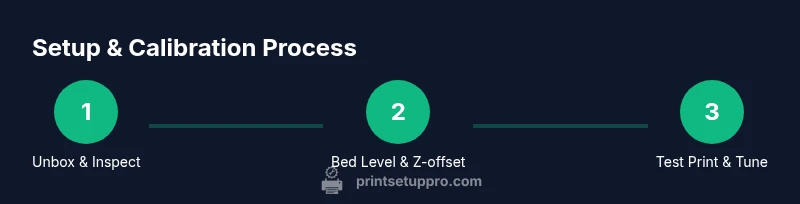
- 1
Unbox and inspect
Carefully remove the printer from packaging, inspect for any shipping damage, and verify that all components are present. Check cables, power supply, and the build plate for signs of impact or misalignment. This initial check prevents surprises during setup.
Tip: Document any shipping damage with photos for warranty claims if needed. - 2
Position and power
Place the printer on a stable, level surface near a power outlet and ensure adequate clearance for moving parts. Connect the power and verify that the firmware boots correctly to the main menu. This step confirms electrical readiness before mechanical work begins.
Tip: Use a surge protector to guard against power spikes during long prints. - 3
Bed leveling and Z-offset
Perform a full-bed leveling procedure using a standard gauge or feeler method. Set the Z-offset so a thin sheet of paper just barely resists between the nozzle and bed across the entire print area. This ensures consistent first-layer adhesion.
Tip: If addressing warping, consider adjusting enclosure temperature or bed temperature within safe ranges. - 4
Load filament and prime extruder
Feed filament through the spool guide, into the extruder, and prime until a steady bead appears on the nozzle. This confirms the pathway is clear and ready for printing. Avoid any drag or kinking in the filament path.
Tip: Use a small spool holder to prevent tangling during long prints. - 5
Run a test print
Start with a simple calibration cube or benchtop model to verify extrusion consistency, first-layer adhesion, and surface finish. Observe the initial layers closely for uniform squish and line width. Make incremental adjustments if needed.
Tip: Keep a log of temperature and flow rate changes for future reference. - 6
Document baseline settings
Record baseline bed temperature, nozzle temperature, print speed, and extrusion multiplier. This baseline supports repeatable results and faster debugging when starting future prints.
Tip: Create a reusable profile named after your material or project for quick future use.
People Also Ask
What materials work best with the BigRep One?
The BigRep One handles a range of filaments, with PLA and PETG as friendly starting options. For strength or heat resistance, engineering polymers can be used, but require careful temperature control and testing. Always verify compatibility with your printer’s hot-end and enclosure before printing.
The BigRep One works well with PLA and PETG for beginners. For stronger parts, try engineering polymers but test carefully for temperature and enclosure compatibility.
How large is the build area and what does that imply for prints?
The BigRep One offers a large build volume that enables full-scale prototypes and functional parts. This volume reduces the need for multiple smaller prints. Plan for longer print times and ensure your workspace supports the resulting heat and material usage.
The BigRep One supports large-scale prototypes; expect longer print times and adequate space for heat and materials.
Is an enclosure necessary for successful prints?
Yes, the enclosure stabilizes temperature, minimizes drafts, and improves layer bonding for many materials. A well-sealed enclosure helps reduce warping on larger parts and improves safety by containing hot components.
Yes, keep the printer enclosed to stabilize temperature and improve adhesion and safety.
How do I level the bed on the BigRep One?
Bed leveling involves adjusting the print bed at multiple points to ensure uniform distance from the nozzle. Use a feeler gauge or standard paper method, and recheck after any major temperature change or travel during a long print.
Level the bed at several points with paper as a gauge, and recheck after big temperature shifts or long jobs.
What maintenance tasks should I perform regularly?
Regular maintenance includes cleaning the build plate, inspecting belts, and checking the cooling fans. Periodically replace worn components, lubricate moving parts, and verify alignment to prevent performance degradation over time.
Do routine cleaning, belt checks, and fan inspections; replace worn parts and keep alignment correct.
Watch Video
Quick Summary
- Plan before printing to avoid costly failures.
- Calibrate bed leveling and extrusion for large prints.
- Choose material and temperatures with stability in mind.
- Maintain enclosure and clean bed for reliable adhesion.