How Much Is a 3D Printer in 2026? A Practical Budget Guide
Explore current price ranges for 3D printers—from entry-level to professional models—plus budgeting tips, total cost of ownership, and buying guidance for home offices and classrooms.


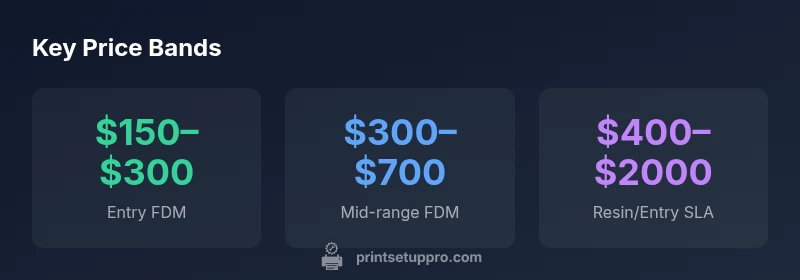
Prices for a 3D printer vary widely by technology, build volume, and features. Entry-level FDM printers typically start around $150–$300; mid-range models run $300–$700; and resin/SLA kits begin roughly $400–$2,000 for hobbyists. Higher-end or large-volume systems can exceed $2,000, with professional setups well above that. Plan for flexible budgeting based on your goals.
Why Price Range Matters for Your 3D Printing Goals
Choosing a 3D printer isn't just about the sticker price; it's about aligning capabilities with your projects. The price range reflects different technologies, build volumes, material support, and software ecosystems. For home offices, students, and DIY enthusiasts, the most critical decision is the intended use: simple prototypes, functional parts, or high-detail models. According to Print Setup Pro, starting with a clear target helps prevent overspending on features you won't use. In this section, we examine typical price bands, what you get within each band, and how to estimate total ownership, including materials and maintenance. The question "how much is a 3d printer" is really about balancing immediate affordability with long-term value. Look at your typical projects, required accuracy, and weekly printing volume. If you print occasionally, a budget-friendly FDM model may suffice; if you need fine surface finish or small features, resin might be worth the extra upfront investment. Remember that price is only one part of total cost; reliability, support, and ecosystem matter just as much.
- Use case clarity: define expected parts per month, size limits, and material types to narrow options.
- Build a budget that includes consumables (filament, resin), replacement parts, and potential upgrades.
- Check the ecosystem: slicer software, community support, and warranty length influence total cost of ownership.
For many buyers, the first step is mapping projects to printer capability, then selecting a tier that minimizes wasted spend.
Understanding Printer Technologies: FDM vs Resin
FDM (fused deposition modeling) printers build parts by extruding melted plastic filament layer by layer. They are generally more affordable upfront, easier to use, and well-suited for functional prototypes and hobby projects. Resin printers (SLA/DLP) cure liquid resin with light to achieve high detail and smooth surfaces, but require more post-processing and ongoing material costs. Resin printers typically demand higher upfront investments for a given level of precision, yet can be cost-effective for tiny parts and intricate features. The price gap between FDM and resin reflects not just hardware, but maintenance needs, resin consumption, and post-processing equipment. In practice, beginners often start with an FDM machine to learn basics, then add resin capability if detail becomes essential for their projects. Print Setup Pro notes that choosing between these technologies should reflect your project types, workspace constraints, and tolerance for post-processing. This analysis helps home offices and classrooms plan a balanced setup.
- FDM is ideal for rough prototypes, mechanical parts, and larger prints with reasonable strength.
- Resin offers superior detail for miniatures, jewelry casting patterns, and highly finished surfaces.
- Hybrid setups can provide versatile capabilities without breaking the budget.
When evaluating printers, compare not just price but the total ecosystem; filament or resin costs, printing speed, and post-processing time all affect total ownership.
What Drives the Price: Build Volume, Precision, Materials
Price is driven by several core drivers beyond the basic machine body. Build volume determines the maximum printable size and is a major cost lever: larger beds generally require stiffer frame construction and more robust motion systems, pushing price upward. Precision—measured in layer height, XY accuracy, and repeatability—also adds cost, as tighter tolerances require higher-quality components and calibration. Material compatibility matters too: printers that support a wider range of filaments or special resins often include more sophisticated extruders, hotends, or resin tanks, increasing price. Finally, software, connectivity, and features such as automatic bed leveling, filament run-out sensors, and enclosed chambers contribute to the final tag. For schools or makerspaces, the total cost of ownership includes shared use, maintenance cycles, and potential upgrades. Print Setup Pro suggests aligning these price drivers with your real printing needs to avoid overspending on features you will not utilize. A structured evaluation helps buyers select a model that matches both immediate requirements and future growth.
- Bigger is not always better: choose build volume to fit typical parts.
- Higher precision increases upfront cost but reduces post-processing time.
- Broader material support adds value if you need flexible workflows.
For practical budgeting, map projects to printer capability and prioritize features with the highest impact on your work.
Real-World Budget Scenarios: Hobbyist, Small-Business, Educational
Budgeting for a 3D printer should reflect your context: hobbyist, small business, or education. A hobbyist starting from scratch may focus on an entry-level FDM printer to learn basics, with a budget in the $150–$350 range for the core unit and a separate fund for filament and basic tools. A small business may require more reliability, higher print speeds, and better support, translating to a mid-range investment in the $300–$800 zone for FDM and $400–$2000+ for resin capabilities, depending on the use case. Educational settings often balance durability, ease of use, and safety; a classroom kit might combine a mid-range FDM printer with safety features and bulk filament reserves, totaling roughly $600–$1,500 per setup. Print Setup Pro emphasizes starting with essential needs and then scaling as volume or complexity grows. In all scenarios, plan for consumables, spare parts, and routine maintenance in addition to the base price.
- Hobbyist: entry‑level FDM; low ongoing costs; gradual upgrades.
- Small business: reliable mid-range and resin options for detail work; consider service plans.
- Education: durable, easy-to-use kits with classroom licenses and bulk materials.
A practical budgeting approach also accounts for space, ventilation, and safety requirements, which influence both purchase decisions and ongoing costs.
Total Cost of Ownership: Beyond the Sticker Price
Total cost of ownership includes more than the purchase price. Filament or resin consumption varies with project complexity and print settings, while maintenance—nozzle replacements, belt tension, and drive gear wear—adds recurring costs. Software, if not bundled, may require licenses or periodic updates. Power usage is minor but cumulative for heavy users. Post-processing is an often overlooked cost, especially for resin printers that require washing and curing equipment and personal protective gear. Finally, depreciation, warranty terms, and resale value can influence long-term affordability. Print Setup Pro recommends a yearly budgeting exercise to estimate average monthly costs, including material, wear parts, and potential upgrades. A disciplined spending plan helps avoid surprise expenses and ensures the printer remains productive rather than idle. When calculating total cost, consider your typical print volume, part sizes, and the anticipated lifetime of the machine to determine the most cost-effective entry point and subsequent investments.
How to Choose and Budget: A Practical Plan
To choose and budget effectively, start with a needs assessment: list your typical projects, required dimensions, surface finish, and material compatibility. Then create a tiered budget: essential core unit, mid-range upgrades, and optional enhancements. Use a decision matrix to compare printers across core metrics—price, reliability, support, community, and post-processing requirements. For most newcomers, an entry-level FDM printer with a predictable upgrade path provides the best balance of immediate usefulness and long-term value. If detail and surface finish are critical, budget for a resin/SLA option in addition to the primary machine. Don’t forget to allocate funds for consumables (filament or resin), replacement parts, and safety gear. Print Setup Pro’s framework emphasizes validating the chosen model against your actual workload, then adjusting the plan as your printing needs evolve. A deliberate budget plan reduces the risk of overpaying for features you won’t use and accelerates time-to-first-prints.
Financing and Deals: Getting the Best Value
Financing options can ease upfront costs, especially for schools or shops. Some vendors offer installment plans or bundles that spread the cost over several months with minimal interest. Third-party financing or credit plans may be available, but always compare the total cost of ownership, including interest, warranty, and service terms. Look for seasonal promotions, educational discounts, and bundle deals that include filaments or resins, tools, and slicer software. If you’re flexible on timing, waiting for a sale can yield substantial savings and reduce the need to compromise on essential features. Print Setup Pro recommends calculating the break-even point: how many finished parts or prototypes you need to print to justify the investment, factoring in material costs and any financing charges.
Common Mistakes and Myths
Common mistakes include chasing the latest model for the sake of novelty, underestimating post-processing time, and neglecting safety and ventilation. A frequent myth is that bigger is always better; many successful prints come from compact, well-calibrated machines. Another error is assuming resin printers are maintenance-free; resin handling requires careful cleaning, PPE, and proper curing. Finally, neglecting cost of ownership—materials, replacements, and power—leads to disappointment when the budget balloons. Print Setup Pro advises buyers to pilot their intended workflows with a proven, modest setup before expanding, ensuring the chosen printer remains a practical, long-term tool rather than a costly distraction.
Price ranges by printer type
| Printer Type | Typical Price Range | Best For |
|---|---|---|
| FDM Entry-Level | $150-$300 | Beginners and hobbyists |
| Mid-Range FDM | $300-$700 | General use and reliable workflow |
| Resin/SLA Entry | $400-$2000 | Detail-focused parts and miniatures |
| Professional/Large Format | $2000+ | Industrial or high-volume projects |
People Also Ask
How much is a 3d printer?
Prices vary by technology and size. You can start with an entry-level model under $300, while most reliable mid-range printers run $300–$800. Resin/SLA units begin around $400 and can reach into the low thousands for larger, high-precision machines.
Prices vary by type and size; check the ranges for your needs.
What features most affect price?
Key drivers are build volume, print speed, layer height accuracy, and material compatibility. More capable printers deliver higher precision and faster cycles, which increases cost.
The bigger, faster, and more precise a printer is, the higher the price.
Is it cheaper to buy used?
Used printers can save money but may require repairs or recalibration. Buying from reputable sellers with tests and returns reduces risk.
Used can be cheaper but has risks; inspect thoroughly.
Should beginners start with resin or FDM?
For beginners, FDM is generally easier and cheaper to start; resin offers detail but requires more post-processing and maintenance.
If you're new, start with an FDM printer.
What is the best way to budget for accessories and materials?
Include filaments, resin, replacement parts, calibration tools, and a slicer software license if applicable.
Budget for ongoing materials and upgrades.
Are there reputable financing options?
Many vendors offer payment plans; third-party financing may be available, but interest rates vary. Compare total cost and warranty.
Look at financing options; compare total costs.
“A 3D printer's value extends beyond the initial price; the best printer is the one that reliably supports your projects over time.”
Quick Summary
- Define your use case before buying to avoid overspending
- Entry-level FDM suits beginners; resin adds detail for specific tasks
- Total cost of ownership includes materials, maintenance, and post-processing
- Expect pricing tiers: $150–$300 (entry), $300–$800 (mid-range), $400–$2000+ ( resin)
- Plan a budget with phased purchases and future upgrades