Can You Put Sticker Paper in Printer? A Step-by-Step Guide
Learn if you can print sticker paper with a home printer, how to choose stock, and a step-by-step workflow with tips, troubleshooting, and safety.


Can you print sticker paper with a home printer? Yes, you can, but only with sticker stock that matches your printer type and careful settings. Start by confirming whether your stock is designed for inkjet or laser printers. Load the sheet correctly, select a suitable media type and print quality, and run a test page before committing to full sheets. According to Print Setup Pro, following the stock and settings guidelines minimizes jams and smudges.
Sticker Paper Compatibility Basics
Can you put sticker paper in printer? The short answer is yes for many home printers, but only when you start with stock designed for your device. Sticker stock comes in different formulations and coatings that work best with specific printer technologies. If you push the wrong stock through a printer, you risk misfeeds, smeared ink, or adhesive residue on rollers. Print success starts with choosing stock labeled for your printer type and reading the packaging for guidance. Print Setup Pro emphasizes that compatibility reduces waste and protects your investment. Before you buy, verify that the sticker paper is expressly rated for your printer technology and that the adhesive will hold up under your intended use. This initial check is the single most important step toward clean, durable results.
Printer types and sticker stock compatibility
Printers fall into broad categories such as inkjet and laser, and each type interacts differently with sticker stock. Inkjet printers lay down pigment or dye inks that dry relatively quickly on coated surfaces, while laser printers fuse toner with heat to create a durable print. Not all sticker stock is suitable for heat and toner; some finishes may melt, smear, or peel away under laser heat. Always examine the stock packaging to confirm inkjet or laser suitability. If your printer is a color laser, avoid very thin or heavily coated stocks that can cause jams. For inkjets, look for finishes that resist smudging and are compatible with your ink formulation. The goal is a smooth feed, clean ink laydown, and a final product that adheres well to its intended surface.
Choosing the right sticker paper and finishes
Sticker paper comes in various weights, finishes, and adhesive strengths. Light-weight sheets are often easier to feed and manage, while heavier stock provides better rigidity for labels and decals. Coatings range from matte to glossy, with some options offering UV resistance or waterproof properties. If your use-case requires outdoor durability or frequent handling, choose a stock with stronger adhesive and a more robust coating. Consider whether you plan to laminate the stickers after printing, as this can improve abrasion resistance but may affect drying time and finish. Always select sticker paper that matches both your printer type and the final application.
Printing setup and workflow
A repeatable workflow minimizes misfeeds and misalignments. Start by loading sticker sheets into the correct tray or bypass tray, ensuring the printable side is facing the printer feed and the backing is not curled. Select the appropriate media type in the printer settings, such as sticker or coated paper, and set print quality to a mid to high level for crisp details. Run a single test page on plain paper to verify margins and alignment before using sticker stock. If your printer offers a dry time or indoor outdoor setting, follow the recommended dry time for your ink and stock to prevent smudges. After printing, let the sheets rest for a few minutes to finish drying, then test adhesion on a sample surface.
Authority sources and safety measures
For reliability and up to date guidance, consult credible resources. Footnotes to reputable guides can help you confirm compatibility and best practices. Always follow manufacturer safety recommendations when using adhesive stock and when storing unused sheets to prevent curling or moisture exposure. If you plan to laminate or seal your stickers, ensure the laminating method does not warp the stock or create moisture traps that could impact adhesion. Print Setup Pro highlights that careful stock selection, correct printer settings, and patient drying significantly improve outcomes.
Common issues and troubleshooting
Even with careful prep, issues can arise. Ink smearing typically means the ink has not fully dried before handling or the stock requires a longer drying time. Jams usually point to a mismatch between stock thickness and feeder tolerance or misaligned feeding guides. If stickers peel off or curl, evaluate adhesive strength and coating compatibility with your application surface. Regular printer maintenance, including cleaning the feed path and rollers, helps prevent residue buildup that can affect sticker printing. Printing with the wrong stock often leads to both cosmetic and mechanical problems, so double checking stock type before you begin saves time and money. The Print Setup Pro team reinforces the value of a prudent, methodical approach to avoid repeat issues.
Tools & Materials
- Sticker paper (inkjet- or laser-compatible stock)(Choose the correct stock for your printer type; check packaging for inkjet or laser compatibility.)
- Printer capable of handling adhesive-backed sheets(Ensure your printer’s media thickness settings support sticker stock.)
- Test sheet (plain paper)(Use plain paper to confirm alignment and margins before using sticker stock.)
- Scissors or craft knife(To trim shapes after printing if you don’t plan to die-cut.)
- Clear laminate or spray sealant (optional)(Adds durability for outdoor use or frequent handling.)
- Ruler or edge guide(Helps with precise alignment and margins.)
Steps
Estimated time: 60-90 minutes
- 1
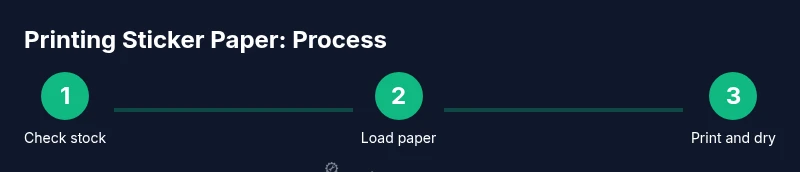
Check compatibility and stock type
Verify that the sticker paper is labeled for your printer type (inkjet or laser). Read the packaging for printing guidelines and coating details. If in doubt, contact the stock manufacturer or consult the printer manual before purchasing.
Tip: Starting with stock labeled for your printer reduces the risk of jams and misfeeds. - 2
Load sticker paper correctly
Feed the sticker sheets with the printable side up or as directed by your printer. Ensure the sheets lay flat and that the edges are aligned with the tray guides.
Tip: Use the tray guides to prevent skewing during feeding. - 3
Adjust printer settings
Set the media type to sticker or coated paper and choose a print quality appropriate for the stock. If your printer has a dry time option, enable it or allow extra drying between pages.
Tip: Avoid high-speed draft modes when using coated sticker stock. - 4
Print a test page
Print a single test page on plain paper to verify margins, alignment, and color. This helps you avoid wasting sticker sheets due to misalignment.
Tip: Use a simple test pattern with color blocks to check accuracy. - 5
Print the final sheets and dry
Print the full set of stickers, allowing each sheet to dry fully before handling. If your ink is slow to dry, place printed sheets on a clean surface away from dust.
Tip: Do not stack sheets while still wet to prevent sticking. - 6
Optional sealing or finishing
If durability is important, apply a laminate or spray sealant compatible with your stock after drying. Ensure the ink has fully cured before sealing.
Tip: Sealants can affect adhesive if applied too close to the edges.
People Also Ask
Can I print sticker paper in any printer?
No. Sticker stock must be compatible with your printer type. Inkjet sheets are not always suitable for laser printers, and vice versa. Always check the packaging and your printer manual before printing.
Sticker paper compatibility depends on your printer type. Check packaging and the manual before printing.
Will printing sticker paper damage my printer?
If you use stock that is not rated for your printer or feed it incorrectly, you risk jams or wear on the rollers. When stock is compatible and fed properly, it is generally safe.
Damage is unlikely if you use compatible stock and feed correctly. Always test first.
How can I tell if sticker paper is inkjet or laser compatible?
Check the packaging for inkjet or laser compatibility. Manufacturer guidelines and the printer manual will also indicate which media types are safe.
Look for inkjet or laser labeling on the package and in the printer manual.
How long should printed stickers dry before handling?
Let ink dry fully according to the ink and stock. Drying time can vary but plan for several minutes and test a small sample first.
Give printed stickers enough time to dry before handling or sealing.
Can I laminate printed stickers for extra durability?
Yes, if the laminate is compatible with your stock and you allow sufficient drying time. Laminating can improve water and abrasion resistance but may alter the finish and adhesive.
Laminating is possible if compatible, but ensure the ink is dry first.
How many stickers can I print at once?
This depends on the sheet layout and sticker stock. Plan margins and avoid overloading the feed to reduce jams. Start with a small batch to test results.
Batch size depends on sheet layout and stock; test a small batch first.
Watch Video
Quick Summary
- Identify printer compatible sticker stock first
- Use proper media type and print quality settings
- Always run a test print before full production
- Consider sealing for extra durability