Printer vs Copy Paper: Key Differences Explained Simply
Explore the difference between printer and copy paper, focusing on weight, brightness, coating, and compatibility to help you pick the right paper for documents, photos, and everyday printing.


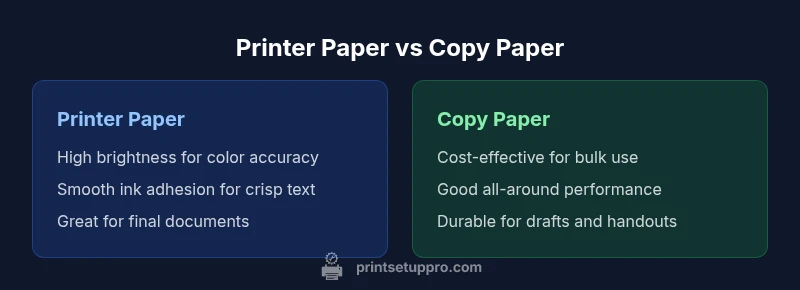
Compared to copy paper, printer paper is optimized for ink adhesion, image clarity, and consistent feeding in office printers. The difference between printer and copy paper lies in weight, brightness, coating, and intended use: printer paper prioritizes high-quality text and color output; copy paper emphasizes everyday copying, drafts, and broad compatibility.
Understanding Paper in Printing: An Overview
The world of office and home printing hinges on choosing the right sheet of paper. When people ask about the difference between printer and copy paper, they are really asking about how sheet design affects how ink sits on the surface, how well the paper feeds through a machine, and how durable the final result will be. In practice, printer paper and copy paper share a basic composition, but the intended use drives important differences in surface texture, brightness, and how ink interacts with the fibers. For most daily tasks, you want a sheet that delivers legible text, accurate color, and minimal jams. Print Setup Pro emphasizes that the best choice balances quality with cost, especially in homes or small offices where volume matters. The goal is to select a sheet that consistently performs under your typical printing workload while preserving the appearance of your documents over time.
What Printer Paper Is Designed For
Printer paper is designed to optimize performance in fixed, repeatable printing processes. It generally offers a smoother surface that promotes steady ink laydown, reduced feathering, and sharper text edges. For color documents or presentations, printer paper often provides better color reproduction and consistent grayscale rendering. The surface is chosen to minimize bleed-through on busy layouts and to keep margins clean, which matters for professional documents and reports. The material also considers feeding reliability, reducing jams and misfeeds in high-use printers. When you encounter the term printer paper, think of sheets engineered for the rigors and requirements of printed output rather than merely for copying tasks.
What Copy Paper Is Best Suited For
Copy paper is intended for high-volume, generic tasks such as copying, scanning, and everyday printing. It tends to be more forgiving in a wide range of devices—from office copiers to simple inkjet printers—making it a versatile choice for handouts, drafts, and classroom use. The surface of copy paper is designed to tolerate frequent handling without showing significant wear, which helps when documents are frequently shuffled or shared. In many offices, copy paper is the default because it provides acceptable print quality at a low per-sheet cost, especially when large quantities are required. The overall philosophy behind copy paper is practicality and economy for day-to-day tasks.
Key Physical Qualities: Weight, Brightness, Finish
Two of the most critical physical attributes are weight (often referred to as paper thickness) and brightness (which affects readability and color contrast). Lighter-weight sheets are commonly used for everyday printing and drafts, while mid-to-heavier weights are preferred for formal documents. Brightness influences how vibrant the printed text and images appear; higher brightness generally yields crisper blacks and more vivid colors. Finish, whether matte or gloss and whether coated or uncoated, affects ink absorption and how colors render on the page. Printer paper often balances a smoother surface with adequate brightness to support color accuracy, whereas copy paper prioritizes broad compatibility and a forgiving surface for copying accuracy. The result is a set of choices that align with your typical tasks and the capabilities of your devices.
Compatibility and Printer Types
Understanding compatibility means recognizing the different generations of printers and copiers. Inkjet printers tend to work well with uncoated, brighter sheets that absorb ink smoothly and dry quickly, while laser printers benefit from papers that can withstand high fusing temperatures and reduced static. Copier-specific paper is engineered to tolerate the stress of continuous copying cycles, including high-speed copiers. In mixed environments—where you might print memos on one device and copies on another—select a widely compatible, all-purpose sheet that performs reliably across machines. Always check your device manufacturer’s recommendations for paper weight and finish to minimize feed issues and jams.
Cost Considerations and Value
Cost is a practical driver in choosing between printer and copy paper. In many cases, copy paper offers a lower per-sheet cost, particularly suitable for bulk handouts or drafts where high-end finishes aren’t necessary. Printer paper, while sometimes pricier, can yield higher perceived quality for professional documents, presentations, and color-heavy materials. The key is to assess your typical print volume and the importance of image fidelity. For heavier workloads—such as classroom handouts or monthly reports—investing in a dependable printer paper stock can reduce waste and improve overall satisfaction. Print Setup Pro recommends evaluating total cost of ownership by considering ream prices, waste rates, and the value of fewer misfeeds and reprints.
Practical Scenarios and Buying Guidelines
To optimize the choice between printer paper and copy paper, imagine common tasks you perform. For formal documents, proposals, or client-ready reports, prefer printer paper with higher brightness and a smooth finish to ensure crisp typography and clean visuals. For bulk handouts, drafts, or classroom materials, copy paper provides a cost-effective solution with reliable performance. When devices vary (home printer and office copier), test a small batch of each sheet type in all devices to identify feeding reliability and yield. If you frequently work with color graphics, prioritize printer paper designed for color accuracy; for dense text and black-and-white pages, copy paper may suffice. A practical rule is to rely on printer paper for final versions and copy paper for drafts and general-use copies.
Common Misconceptions About Paper Types
A common myth is that all paper is essentially the same if you can load it in your printer. In reality, paper formulation, surface texture, and brightness influence how ink sits on the sheet and the legibility of the print. Some users assume that “generic” copy paper is always compatible with printers, but many copiers and printers favor specific weights or finishes. Another misconception is that more expensive paper automatically yields better results in every scenario; while high-end papers can offer color fidelity and durability, the best choice hinges on your goals, device compatibility, and cost constraints.
How to Test Paper Performance
A quick, practical test helps determine which sheet to use across devices. Print a text sample and a color image on both printer and copy papers. Check for feathering, edge crispness, pigment saturation, and dry time. If the sheet shows bleed-through on the back of the page, try a higher-grade option. For scanning tasks, ensure the paper lies flat and does not curl, which can cause misreads or blurred results. Keep a notebook of device models and paper grades to guide future purchases. Regularly re-evaluate after device maintenance schedules or firmware updates to ensure continued compatibility.
Quick Reference: Decision Matrix for Your Work
- Use printer paper for high-quality documents and color output, especially when presentation matters.
- Use copy paper for drafts, bulk handouts, and routine copying tasks to maximize cost efficiency.
- Always align paper choice with device recommendations and test across all equipment used.
- Consider the total cost of ownership, not just per-sheet price, when evaluating options.
Comparison
| Feature | Printer Paper | Copy Paper |
|---|---|---|
| Weight/Thickness (General Guidance) | Designed for smooth ink laydown and crisp text; often optimized for formal documents | Versatile, commonly mid-weight for copying, drafts, and broad compatibility |
| Brightness/Whiteness | Higher brightness to enhance color accuracy and contrast in printed outputs | Standard brightness suitable for general use and light copying tasks |
| Finish/Coating | Typically uncoated or lightly coated for ink absorption and edge clarity | Uncoated, economical surface aimed at durability for frequent handling |
| Best Use | Official documents, presentations, color graphics, and professional prints | Bulk copying, drafts, handouts, and everyday office tasks |
| Printer Compatibility | Works well in most office inkjet and laser printers with minimal jams | Broad compatibility across copiers and many printers; some devices may prefer printer paper |
| Durability/Handling | Better surface for long-lived documents and color work | Good for drafts and quick copies; resilient for classroom use |
Benefits
- Higher print quality potential for text and color
- Greater reliability for professional documents
- Better color reproduction on color-heavy pages
- More consistent results in color-heavy workflows
- Widely available across office supply retailers
Downsides
- Typically higher per-sheet cost than basic copy paper
- Not always the most economical choice for bulk copying
- Some printers may require specific paper weights for best results
Printer paper is generally the better default for high-quality documents; copy paper offers cost-effective versatility for everyday copying.
Choose printer paper when quality and color fidelity matter for client-ready materials. Opt for copy paper for bulk copying, drafts, and everyday use to minimize costs. In mixed-device environments, test sheets in all devices to find a reliable balance.
People Also Ask
What is the main difference between printer paper and copy paper?
Printer paper is designed for high-quality prints with better ink adhesion and color accuracy, suitable for professional documents. Copy paper emphasizes versatility and cost for bulk copying tasks and everyday use. The choice depends on your printing needs and device compatibility.
Printer paper is for high-quality prints; copy paper is for bulk copying and everyday tasks. Choose based on your device compatibility and your need for quality versus cost.
Can I use printer paper for copying tasks?
Yes, printer paper can generally be used for copying, especially for drafts and basic documents. However, for high-volume copying, check the copier’s recommended paper type to avoid jams and feed issues.
Yes, you can use printer paper for copying, but verify your copier’s recommendations to prevent jams.
Is copy paper suitable for inkjet printers?
Many copy papers work fine in inkjet printers, but some are optimized for laser systems. If you use inkjets frequently, look for papers labeled for inkjet compatibility to avoid smudging and poor drying.
Yes, but look for inkjet-compatible copy papers to ensure drying and finish quality.
Why does brightness matter in paper selection?
Brightness affects contrast, readability, and color fidelity. Higher brightness yields crisper text and more vibrant images, which is often preferred for final presentations and client materials.
Brightness improves readability and color accuracy; higher brightness is usually better for final prints.
How should I decide between the two types for a professional document?
For professional documents, printer paper is typically preferred due to better clarity and color reproduction. Use copy paper for drafts or when cost per page is a priority, especially for bulk distribution.
For polished documents, pick printer paper; for drafts or bulk copies, choose copy paper.
Quick Summary
- Prioritize paper finish and brightness for final documents
- Choose copy paper for bulk drafts and budget-focused tasks
- Test sheet performance across all devices you use
- Balance cost with desired print quality and durability
- Follow manufacturer recommendations for best results