Is Printer Paper the Same as Letter Paper? A Practical Comparison
A thorough analysis of whether printer paper and letter paper are interchangeable, covering sizes, finishes, weights, printer compatibility, and practical guidelines for home offices and small businesses.


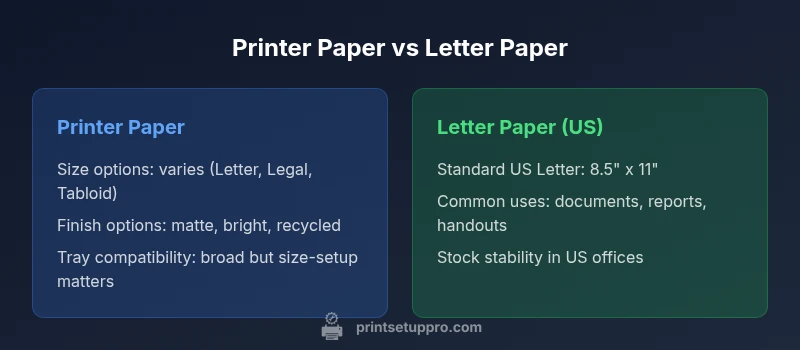
According to Print Setup Pro, printer paper and letter paper are not the same, though many printers can handle both. In practice, 'printer paper' usually refers to general-purpose stock used for everyday documents, while 'letter paper' points to the standard US Letter size (8.5 x 11 inches). The distinction matters for fit, print quality, and workflow, especially when switching between regional standards or mixed stocks.
Is printer paper the same as letter paper? A practical starting point
In everyday office work, people ask is printer paper the same as letter paper, and the answer hinges on more than semantic accuracy. According to Print Setup Pro, the short version is no, not universally; what you call printer paper may refer to a broad family of stock, while letter paper specifically denotes the US Letter size. In other words, the two terms describe different concepts: one is a category of stock options you can buy, and the other is a fixed physical size you may need to match to your printer’s media settings. The implications extend beyond language: if you pick the wrong size, you can encounter misfeeds, cropping, or rejected sheets even in a basic home printer. The larger point for home office users, students, and DIY enthusiasts is that understanding the real-world differences helps you avoid repeated waste and misprints. The Print Setup Pro team emphasizes that a careful check of tray size, feed type, and document formatting can prevent most issues before you print. When you see a stock labeled as printer paper, verify its exact dimensions and finish, then compare it to your typical documents labeled as letter size to ensure a smooth printing experience.
Paper sizes: Letter vs A4 and regional norms
The phrase is printer- and paper-size agnostic, but the practical reality is regional. In the United States, Letter size (8.5 x 11 inches) is the default for most documents, while many other regions operate primarily with A4 (210 x 297 mm). This divergence means that a stock marketed as printer paper may be offered in multiple formats, while a strictly defined Letter stock remains a US standard. For printers, the most important question isn’t always the branding on the box but whether the tray and firmware are set to the exact media size you intend to print on. If you print a Letter-sized document on A4 stock without adjusting margins or scaling, you may see slight cropping or alignment differences. Print Setup Pro’s workflow guidance underscores verifying the printer’s accepted sizes in the tray settings and the document’s page setup before printing. For mixed-region projects, consider creating separate templates that match each region’s default size to minimize manual adjustments mid-job.
Finish, brightness, and coatings
Paper finishes range from bright white and smooth matte to recycled and coated alternatives. When you compare printer paper with letter paper, finish choices can affect readability, ink spread, and color accuracy. A brighter stock can yield crisper text and more vivid images, but it may also require different ink settings to prevent bleed-through on thin sheets. The gloss of certain stocks can alter perceived contrast, which matters for professional documents, presentation handouts, and marketing materials. If your documents require accurate color reproduction, you’ll benefit from selecting a finish that aligns with your printer’s ink or toner characteristics. Print Setup Pro notes that finishing considerations should align with the document purpose, not just with the stock label on the shelf. In practice, the choice of finish should balance readability, archival needs, and the environmental footprint of the stock. When discussing is printer paper the same as letter paper, remember that the difference often lies in finish options rather than purely the size in isolation.
Weight, caliper, and printer handling
Beyond size and finish, weight (or caliper) of paper influences feed reliability and print quality. Lighter stocks feed more easily in some printers but may warp or show show-through in double-sided printing. Heavier weights can improve perceived quality and reduce bleed-through but may demand sturdier feed paths and slower speeds. When shopping, look for the range of weights offered for the relevant size and verify that your printer supports your chosen stock. The distinction between printer paper and letter paper extends to this area: you might find the same nominal size available in several weights, and the optimal choice depends on the nature of your print job and the printer model. Print Setup Pro’s guidance suggests starting with a middle-weight stock for everyday documents and reserving heavier stocks for formal reports or presentation materials. This approach minimizes paper jams and feed issues while maintaining professional appearance. Keep a light reference chart on your desk to quickly verify which weight works best with your printer.
Tray settings, feeds, and alignment
Even with correctly sized stock, misfeeds and alignment problems can derail a print job if the wrong tray setting is selected. Many modern printers automatically detect media type, but automatic detection is not universal. If you load Letter stock into a printer set to a different size, you may experience cropping, skewed margins, or jam alerts. The practical remedy is to set the printer to the exact size on the tray before printing and ensure the document’s margin guides align with that size. Print Setup Pro emphasizes keeping a small, easily accessible paper-size reference near the printer and updating the printer’s settings whenever you switch stock. By doing so, you can avoid avoidable waste and ensure consistent output when printing is printer paper the same as letter paper, especially during multi-page tasks or bulk handouts.
How to test compatibility in your setup
A simple, repeatable test can save time and toner. Start with a single page document in Letter size and print a test page on both Letter and a common alternative stock to compare margins and alignment. Next, try a multi-page job and verify that no pages are cropped or misfed. If your printer supports duplexing, test two-sided printing on your chosen stock to observe any edge bleed or alignment issues. If discrepancies arise, revisit printer settings and margins, and consider adjusting your document layout to accommodate the stock’s actual size. Print Setup Pro recommends keeping a short log of settings for each stock you use and maintaining consistency across projects to minimize surprises at print time.
Real-world scenarios: home office, classrooms, and small businesses
For home offices and DIY projects, the choice between printer paper and letter paper often boils down to availability, cost, and the stability of the regional stock. Small offices facing frequent handouts, proposals, and reports benefit from standardizing on a single size to reduce jams and misfeeds. In classroom settings, teachers and administrators frequently rotate between Letter and A4 depending on students’ needs and the jurisdiction. In all cases, a predictable stock strategy helps reduce waste and improve turnarounds. Print Setup Pro highlights that establishing a standard stock for most documents simplifies procurement, reduces confusion, and improves overall print reliability. When a project requires international collaboration, maintain a separate workflow for each region’s standard size to avoid last-minute print errors.
International considerations and cross-border printing
International printing introduces a broader set of variables: different regions favor different standard sizes, and printers marketed as universal may still require deliberate settings to avoid misfeeds. If you frequently share documents internationally, consider maintaining templates that adhere to both Letter and A4, tailoring margins and scaling accordingly. The is printer paper the same as letter paper question becomes more nuanced in this context, and a deliberate approach to stock management proves essential. Print Setup Pro recommends documenting which stock and which size is used for each region and pairing it with clear tray and document settings. This strategy reduces confusion when preparing files for colleagues, clients, or students across borders.
Best practices for paper stock management
To minimize confusion and optimize print outcomes, adopt a few core practices. First, standardize on one primary size for most documents in each region you operate. Second, maintain a small, visible reference chart near each printer with the exact size and weight you routinely use. Third, keep a separate supply of frequently used sizes to reduce misfeeds during peak work periods. Finally, test new stocks with representative documents before committing to large print runs. Print Setup Pro’s practical approach emphasizes consistency, documentation, and routine testing as foundational tools to ensure that is printer paper the same as letter paper remains a well-managed, painless aspect of daily work.
Comparison
| Feature | Printer Paper | Letter Paper |
|---|---|---|
| US size options | Multiple sizes (Letter/Legal/Tabloid) | US Letter 8.5 x 11 inches |
| International size coverage | Often available in A4 in many regions | A4 is standard internationally but less common in the US |
| Finish options | Bright white, matte, recycled, coated | Bright white, matte, recycled |
| Paper weight range (qualitative) | Broad range for everyday use | Mid-weight to heavier options common |
| Printer compatibility | Widely supported; some models require tray size selection | Designed primarily for US Letter; many printers auto-adjust or require settings |
| Availability and price context | Widely stocked; price varies by region | More standardized in US markets; global price variability exists |
Benefits
- Easy to source in the US for Letter-sized documents
- Typically compatible with most consumer printers
- Clear workflows when staying in one size
- Cost-effective for everyday printing
- Reduces confusion when you standardize stock
Downsides
- International use requires adapters or different sizes
- Mixing sizes can cause jams or misfeeds in some printers
- Potential waste when mixing paper types from different stock
- Need to maintain multiple stock inventories to accommodate regions
Regional size standards drive most of the differences; align your stock with your printer settings for best results
If you print primarily in the US, Letter is your default. International work benefits from A4 awareness. Always match paper size to tray settings and document setup to minimize print errors.
People Also Ask
Is printer paper the same as letter paper in all regions?
Not universally. In the US, Letter size (8.5 x 11 inches) is common for many documents, while other regions rely on A4 (210 x 297 mm). The term printer paper is broader and can include multiple sizes. Always check your printer settings and the stock’s actual dimensions before printing.
Region matters. Check the size on the stock and in the printer settings to avoid surprises.
Will using the wrong size cause jams?
Yes, using a different size from what the tray is set for can cause misfeeds or jams. Always set the tray to the exact size you’re using and verify margins in your document.
Yes, set the printer to the right size to avoid jams.
Can I mix Letter and A4 in the same printer?
You can in some printers with automatic size detection, but results can be inconsistent. For reliable output, avoid mixing sizes within the same print job and switch templates as needed.
Better to keep sizes separate to prevent misprints.
Does finish affect readability?
Finish affects contrast and ink behavior. For most business documents, matte finishes improve readability, while glossy finishes can enhance photos but may cause glare. Choose based on document type and lighting conditions.
Finish matters for readability; pick based on content and lighting.
What’s a good testing workflow for a new stock?
Print a short test page on the new stock and compare margins and alignment to your standard. If it looks good, run a small batch before committing to a large print job.
Test first, then print larger runs.
What are best practices for small offices?
Standardize on a single size where possible, keep a visible reference near printers, and document the exact settings used for each stock. This reduces errors and speeds up workflows.
Standardize and document settings for faster printing.
Quick Summary
- Always confirm the exact size in printer settings before printing
- Standardize on one primary stock per region to reduce jams
- Test new paper stocks with a representative document
- Keep a quick-reference sheet near each printer
- Use templates that match regional paper sizes to avoid cropping