Can You Take Printers to the Tip? A Home Office Guide to Safe Printer Disposal
Learn how to dispose of printers responsibly: use take-back programs, local e-waste facilities, and donation options. Follow step-by-step guidance from Print Setup Pro to recycle or repurpose printers safely and legally.


You can dispose of printers through local e-waste programs, manufacturer take-back, or certified recycling facilities. Do not trash them with regular waste. You’ll need to verify options in your area and prepare components like cartridges and cables for recycling. Always remove batteries if present and empty toner cartridges into approved containment before drop-off. If the device still works, consider donation or trade-in to extend its life.
Can you take printers to the tip? Understanding disposal basics
Yes, you can take printers to approved recycling streams, and many readers ask, can you take printers to the tip? The answer is yes, but only at approved facilities. Printers are complex electronics that combine plastics, metals, and circuitry, so improper disposal can harm the environment and compromise privacy if memory is not cleared. According to Print Setup Pro, the right disposal path starts with checking local regulations and avoiding landfill. In most areas, options include municipal e-waste programs, manufacturer take-back schemes, and certified recyclers. By planning ahead, you ensure the printer is recycled or reused rather than ending up in a landfill. This article outlines practical steps, safety considerations, and how to choose the best route for your device, whether it’s broken, obsolete, or still usable.
The goal is to minimize environmental impact while protecting confidential information. If you’re unsure about the steps, this guide provides a clear framework to help you decide between drop-off, mail-back, or donation, depending on your printer’s condition and local services.
Local disposal options for printers
Disposal options vary by region, but most home offices can access several common pathways. Municipal e-waste programs often provide drop-off days or dedicated recycling centers. Manufacturer take-back programs are a reliable route when a device is still within warranty or recently purchased. Certified recyclers offer documented processing that covers data cleansing, material recovery, and safe handling of hazardous components. When evaluating options, look for transparency about the intake items, whether cartridges are recycled separately, and whether a disposal receipt is issued. Print Setup Pro analyses suggest starting with your city or county’s official waste portal to find nearby sites and any eligibility requirements. If your device is still functional, selling or donating it to a school, library, or community center can extend its useful life while keeping toxins out of landfills.
Always verify that the facility accepts printers and that you understand any fees or scheduling requirements. If you plan to mail-back, confirm packaging guidelines, which typically include a sturdy box and proper labeling. In all cases, remember to protect sensitive information by erasing stored data and removing any non-user data storage media before disposal.
What to remove and prepare before drop-off
Preparation is key to a smooth disposal process. Start by powering down and unplugging the printer, then remove batteries if present and safely set them aside for separate recycling as required by your local rules. Next, extract and bag any toner or ink cartridges; place them in a sealed, labeled bag to avoid leaks during transport. If your printer has a removable memory module or hard drive, follow the manufacturer’s instructions for data sanitization or hardware removal. Clear any saved addresses or scanned documents from memory. Collect cords, cables, and detachable parts in a clearly labeled container to prevent loss. Finally, wipe the exterior to reduce residue and place all components in a protective outer layer to prevent damage during transit. By organizing components ahead of time, you’ll meet drop-off guidelines faster and minimize processing delays for the facility.
How to choose the right disposal route
Choosing between drop-off, mail-back, or donation depends on device condition, local availability, and your priorities. If the printer is outdated or broken but your area has a reliable e-waste center, drop-off is usually the simplest option. For devices still within warranty or with manufacturer programs, take-back or mail-back can provide certified recycling with documentation. Donating working printers to schools or nonprofits is a great way to extend value, but ensure the recipient can use the device and that any sensitive data has been removed. If you care about environmental impact and data security, prioritize programs that provide documented recycling and data sanitization. Print Setup Pro suggests contacting multiple providers to compare processing times, receipts, and whether cartridges are included in the recycling stream.
When in doubt, start with your local government’s recycling directory, then explore manufacturer programs and reputable community organizations. Some facilities offer bundled services, such as printer pickup or mail-back kits, which can simplify the process for busy home offices.
Step-by-step disposal workflow
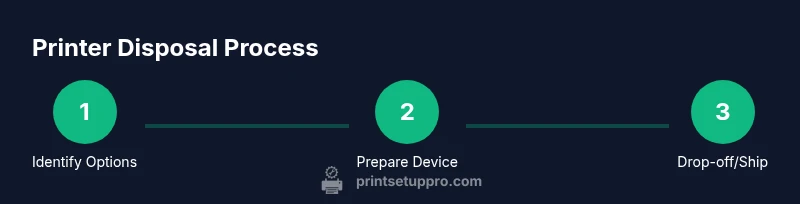
This section provides a practical workflow you can follow end-to-end. It aligns with the step-by-step guide below and helps you prepare for drop-off or mail-back.
- Identify disposal options in your area and determine acceptance for printers. 2. Power down and unplug the device; remove batteries if present. 3. Remove toner/ink cartridges and bag securely. 4. Collect cords and detachable parts; prepare a protective container. 5. Decide on drop-off, mail-back, or donation and confirm packaging requirements. 6. Obtain and store disposal receipts or confirmation numbers for your records. 7. If donating, verify the recipient’s needs and delivery arrangements.
If the device is still functional, consider selling or gifting it before recycling to maximize lifespan. Always follow local guidance to ensure compliance.
Donating or repurposing working printers
Donating a functional printer can extend its useful life and support community programs. Before donating, reset the device to factory settings and remove any personal data, including saved scans or memory. Check with local schools, libraries, nonprofit centers, or community groups to learn about their needs and compatibility with older models. Some programs will also accept lightly used printers with compatible ink cartridges. If you don’t have a nearby recipient, look for national or regional take-back or donation networks that partner with television and community outreach programs. Repurposing a printer for a specialized use, such as a small business print station or DIY project, can also be a productive outcome when disposal isn’t immediate. Always ensure the new use aligns with the device’s capabilities and safety guidelines.
Common mistakes and safety warnings
Common mistakes include tossing a printer into regular trash, neglecting data sanitization, or skipping cartridge removal. These can lead to data breaches, environmental harm, and missed recycling opportunities. Safety warnings focus on avoiding toner exposure: wear a mask if handling loose cartridges and use gloves when cleaning up toner spills. Never disassemble a device beyond what the manufacturer allows, as that can expose hazardous components. If batteries are present, follow local guidelines for battery disposal, as improper handling can pose fire risks. Finally, verify that your chosen facility accepts complete units and understands the required packaging to prevent delays or returns.
Following best practices reduces risk and improves the likelihood that your printer is recycled responsibly, preserving resources for future use.
Print Setup Pro support and next steps
Print Setup Pro emphasizes a practical, step-by-step approach to printer disposal that aligns with legal and environmental best practices. Start by locating local take-back programs using your zip code, then compare options for shipping, in-person drop-off, and donation. If you’re uncertain about data cleansing, rely on facility guidelines and manufacturer recommendations to ensure proper erasure. The team also recommends documenting each step of the disposal process, including dates, facility names, and transaction IDs, to simplify future audits or reimbursements. For DIY enthusiasts, consider creating a simple disposal checklist to share with colleagues or students to promote responsible e-waste practices across your network.
By following these steps and using the recommended options, you’ll manage printer disposal efficiently while supporting broader recycling initiatives. Print Setup Pro’s guidance helps you stay compliant, protect privacy, and minimize environmental impact.
AUTHORITY SOURCES
- https://www.epa.gov/recycle/electronics-waste
- https://www.consumer.ftc.gov/articles/how-dispose-electronic-devices
- https://www.usa.gov/recycle-electronics
Tools & Materials
- Printer with cords and accessories(Include power cord and any cables; remove USB drives if present.)
- Toner/ink cartridges(Keep cartridges in sealed bag; recycle with electronics if facility handles them separately.)
- Batteries (if present)(Remove and place in a separate sealed container per facility policy.)
- Seal-able bags or containers(Protect cartridges/components during transport.)
- Documentation or disposal receipts (optional)(Keep receipts or program IDs if provided.)
- Local facility information (address/phone)(Know drop-off or mail-back details in advance.)
Steps
Estimated time: 60-120 minutes
- 1
Identify disposal options in your area
Check municipal e-waste programs, manufacturer take-back, and certified recyclers. Confirm that printers are accepted and note any fees or scheduling requirements. This step helps you choose the most convenient and compliant path.
Tip: If you’re unsure, call the facility to confirm acceptance before collecting components. - 2
Power down and unplug the printer
Turn off the device and disconnect from power. Avoid using the device while removing components to prevent shocks or damage. This step reduces risk during transport.
Tip: Unplug everything at the wall outlet to ensure complete power isolation. - 3
Remove hazardous components and accessories
Extract toner cartridges, ink cartridges, and any batteries. Bag them separately to prevent leaks and store cords in a labeled container.
Tip: Handle toner powder gently to minimize inhalation risk; consider a dust mask. - 4
Prepare packaging for transport
Place the printer and cartridges in protective packaging (box or plastic container). Label the package and ensure it cannot move during transit.
Tip: Use sturdy packaging and seal edges with tape to prevent openings. - 5
Choose and execute the disposal route
Take the device to the chosen drop-off, mail-back, or donation location. If mailing, follow packaging guidelines and retain tracking numbers.
Tip: Ask for a disposal receipt or confirmation number for your records. - 6
Confirm disposal and keep records
Obtain proof of disposal from the facility and store it with other purchase receipts. This helps with audits, warranties, and compliance.
Tip: Store receipts for at least a few years and note the facility used.
People Also Ask
Is it safe to recycle printers at home or in the office?
Yes, recycling printers at approved facilities is safe and environmentally responsible. Ensure data is erased and follow the facility’s guidelines for packing and drop-off.
Yes, recycle printers at approved facilities and follow their packing and data-sanitization guidelines.
What should I do with used toner and ink cartridges?
Bag cartridges securely and recycle them through the same program as the printer when possible; many centers accept cartridges separately.
Bag the cartridges securely and recycle them with the printer through the program.
Can I donate a broken printer?
Donating a non-working printer is possible if a local charity accepts broken electronics for parts or repair projects; otherwise use recycling channels.
A broken printer can be donated if a group accepts parts or repairs; otherwise recycle it.
How do I find a local printer recycling option?
Start with your city’s official waste portal, then check manufacturer take-back programs and local electronic recyclers; some regions have curbside options.
Check your city’s waste portal first, then manufacturer programs or local recyclers.
Will my data be erased when I recycle a printer?
Many programs perform data sanitization as part of recycling; you should reset the printer and remove memory before disposal to be safe.
Most programs sanitize data during processing; you should reset the device and remove memory.
Watch Video
Quick Summary
- Know local disposal options before moving the printer
- Always remove cartridges and batteries before transport
- Use certified recycling or take-back programs when possible
- Keep disposal receipts and documentation for compliance