How to Get Rid of an Old Printer: A Step-by-Step Guide
Learn safe, eco-friendly ways to dispose of your old printer. This step-by-step guide covers data wiping, donation, recycling, and how to handle cartridges and accessories responsibly.


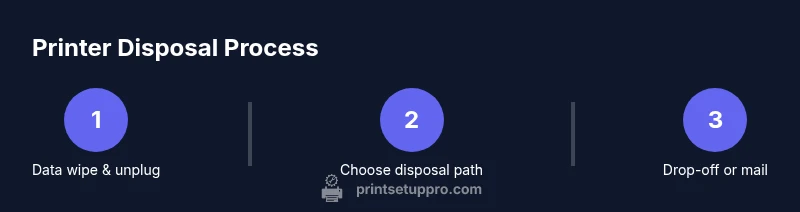
You can safely get rid of an old printer by choosing a recycling drop-off, donating when possible, or selling for parts. Before you proceed, wipe data, unplug, and remove cartridges if feasible. Follow local guidelines and use approved disposal paths to minimize environmental impact.
Why disposing an old printer matters
Electronic waste is a growing concern worldwide. Printers contain plastics, metals, and sometimes hazardous components like toner particles. Proper disposal helps prevent environmental contamination, conserves natural resources through recycling, and supports a circular economy. According to Print Setup Pro, planning your disposal reduces last-minute scrambles and ensures you meet local regulations. Making a deliberate choice also signals responsible consumer behavior and can simplify future recycling or donation efforts for others in your community.
Legal and environmental considerations
Disposal regulations vary by region, but most areas encourage or require electronics recycling programs for printers. Many centers offer free drop-offs or mail-back options, and some require that cartridges be removed before recycling. Factory resets or data-clearing steps may be necessary for devices that retain configuration information. Print Setup Pro Analysis, 2026, notes that following official guidelines minimizes penalties and ensures the device is processed correctly and securely.
Data safety: wipe, reset, and remove data
Data privacy should be a priority before disposal. Start by consulting your printer’s manual for a factory reset option if available. If a reset isn’t accessible, remove any removable memory or cartridges and disconnect the unit from all networks. Even if the printer seems dormant, clear stored network credentials and settings. Keep a short note of the steps you took in case you need to prove data handling compliance to a recycler or charity.
Determine the best disposal path (donate, recycle, sell)
Your choice depends on device condition, warranties, and local programs. Donating a functioning printer to schools, libraries, or nonprofits can extend the device’s life and provide public benefit. Recycling at a certified e-waste facility is a safe option for non-functional units. Some manufacturers and retailers offer trade-in or buyback programs that credit you toward a newer model. Always verify the eligibility criteria and whether a facility will accept printers with accessories.
Donating your printer: tips to maximize acceptance
Before donating, ensure the printer powers on, if possible, and includes essential cables. Include drivers or manuals if you have them; a clean, uncluttered unit is more appealing to recipients. Contact the organization beforehand to confirm compatibility with their equipment and any age or model restrictions. If a donation is refused, ask for a recommendation to another local charity or school. Remember to remove sensitive data and wipe settings to avoid privacy concerns.
Recycling: what to expect at a certified e-waste facility
Certified e-waste facilities disassemble devices to recover plastics, metals, and glass while safely handling hazardous substances. Toner cartridges should be removed and recycled separately, and any batteries or memory modules should be handled according to facility guidelines. Bring your printer in its original packaging if you have it, or use a sturdy box with padding to protect it during transport. Expect a processing receipt and, in some cases, a small disposal fee waived for donations or certain programs.
How to find a local recycler or donation center
Start with a simple search using terms like “printer recycling near me” or “electronics donation drop-off.” Call ahead to confirm acceptance, hours, and any required documentation. Community colleges, libraries, and nonprofit tech programs are often excellent donation partners. If you’re unsure, ask a neighbor or local recycling cooperative for vetted recommendations. Print Setup Pro suggests verifying that the facility adheres to e-waste standards and provides proper documentation for tax purposes when donating.
Packaging and shipping: preparing for drop-off
For safe transport, remove loose parts and pack the printer in protective material to prevent damage. Include all power and data cables, even if you intend to remove them later, to avoid misplacing items. If you’re mailing the unit, use a strong corrugated box, fill voids with bubble wrap, and seal with packing tape. Attach a label with your return address and the recipient’s address, plus a note indicating whether you’ve removed cartridges and performed a reset if applicable.
Handling cartridges, inks, and consumables
Toner cartridges and ink tanks can leak if mishandled. Place cartridges in their original unopened packaging or wrap them in protective material to prevent spills. If cartridges are still usable, consider offering them separately to the recipient or recycling them through an approved program. Do not mix empty and full cartridges in a single container, and avoid crushing any components that may release hazardous dust.
What not to do when disposing
Do not discard printers in regular trash where prohibited by local law. Do not incinerate devices or damage internal components. Avoid removing components that you are uncertain about; consult the manual or a professional if you suspect hazardous materials. Never bypass safety instructions or attempt DIY repairs that could cause leaks or injuries during transport or handling.
After disposal: receipts and documentation
Ask for a receipt or certificate of disposal from the facility or charity. This documentation can be important for tax purposes or corporate compliance. Save digital copies of any transfer paperwork, including the recipient’s contact information and the device’s model or serial number if available. Maintaining records helps you prove responsible disposal and can simplify audits or future recycling arrangements.
Common myths and quick facts
Myth: All printers are worthless after donation—don’t bother trying. Fact: Many functioning printers still provide value for schools and nonprofits. Myth: Recycling is slow and costly. Fact: Reputable programs offer straightforward drop-offs or mail-back options. Myth: Personal data cannot be cleared from printers. Fact: Factory resets and data removal steps can protect your information when done properly.
Tools & Materials
- Old printer unit(Include all cables if possible; keep it powered off until packing.)
- Power cable(Keep the original power cord if available.)
- Packaging box or shipping container(Use sturdy box with padding for transport.)
- Toner cartridges/inks(Remove and seal to prevent leaks; recycle separately.)
- Packing material (bubble wrap, packing paper)(Use to fill gaps and protect components.)
Steps
Estimated time: 45-90 minutes
- 1
Power down and unplug
Ensure the printer is completely shut off and disconnected from power, USB, Ethernet, and any wireless connections. This eliminates electrical hazards and prevents data leakage during handling.
Tip: If you can, unplug at the wall outlet for a clean disconnection. - 2
Back up and wipe data
Consult the manual for a factory reset option. If available, perform the reset to clear settings. Remove any removable memory or cartridges to reduce data exposure during transport.
Tip: Document the reset steps you performed for your records. - 3
Remove cartridges and accessories
Carefully extract toner cartridges or ink tanks and seal them to prevent leaks. Gather cables, manuals, and any accessories to include with the donation or recycling package.
Tip: Keep cartridges separate from other components to avoid cross-contamination. - 4
Choose disposal path
Decide whether to donate, recycle, or trade-in. Confirm the recipient’s acceptance criteria and whether they require working condition or specific models.
Tip: If donating, contact the recipient to confirm compatibility before packaging. - 5
Prepare packaging
Wrap the printer in protective material and place it in a suitable box. Include all accessories requested by the recipient or recycler.
Tip: Label the box with the destination and contact information. - 6
Label and document
Attach a disposal label if required and include a short note about what is inside. Retain any receipts or transfer documents for your records.
Tip: Keep digital copies of all receipts and transfer documents. - 7
Ship or drop off
Take the package to the drop-off location or initiate the mail-back program. If shipping, choose a trackable service and insure valuable items when possible.
Tip: Get a tracking number and keep it until the recipient confirms receipt. - 8
Obtain proof of disposal
Request a receipt or certificate from the facility or charity. Store it with your records for tax or compliance purposes.
Tip: If you donated, ask for a written confirmation of the device’s model and condition.
People Also Ask
What should I do with old printer cartridges and toners?
Remove cartridges and recycle them using a program that accepts toner and ink. If still usable, offer them to the recipient or a local repair shop. Always separate cartridges from the main device when shipping or dropping off.
Remove the cartridges, then recycle or donate any usable ones. Separate them from the printer before transportation.
Can I recycle a broken printer?
Yes. Most certified e-waste facilities accept broken printers. Check whether the facility handles the specific model and whether you need to remove batteries or other components first.
Yes, most places will recycle a broken printer. Call ahead to confirm requirements.
Will my data be safe during disposal?
Wipe data using a factory reset if available and remove any removable memory. Disconnect from networks and avoid storing sensitive configurations on the device.
Make sure you reset and remove memory, then disconnect from all networks.
Is there usually a cost to dispose of a printer?
Many programs are free, especially for donations and official recycling. Some drop-off sites may charge a small fee for processing or packaging materials.
Usually free, but some programs may charge a small fee for processing.
How long does disposal take?
It varies by program and location. A typical drop-off or mail-back process can take anywhere from a few days to a couple of weeks depending on scheduling and transport.
It can take a few days to a couple of weeks, depending on the program.
Watch Video
Quick Summary
- Plan disposal through approved channels
- Data wipes protect privacy and meet guidelines
- Donations extend device life and support communities
- Keep receipts for tax and compliance