Your Essential Guide to a 3D Printer for House
A practical, step-by-step guide to choosing, setting up, and maintaining a 3D printer for home use. Learn safety, print quality, basic projects, and maintenance for home offices, students, and DIY enthusiasts.


Set up and use a 3D printer for home projects, from choosing a model to calibration and maintenance. This guide helps home office users, students, and DIY enthusiasts select the right printer, understand safety basics, run first prints, and manage ongoing upkeep. You’ll gain practical tips for filament, bed leveling, and simple home-ready projects.
Why a 3D printer for house matters
For a household, a 3D printer opens a door to rapid prototyping and on-demand parts. Home offices, students, and DIY enthusiasts can design, print, and iterate without relying on external suppliers. According to Print Setup Pro, a well-chosen home 3D printer can cut downtime waiting for parts and boost hands-on problem solving, from mounting brackets to custom enclosures and replacement knobs. Projects range from practical items like cable organizers and phone stands to educational models and hobbyist automation components. The ability to customize objects means you can tailor your tools to your exact space and workflow, whether you’re building a compact home lab, a study desk organizer, or a kitchen gadget rack. Beyond prints, the skills you gain—reading CAD files, slicing geometry, and selecting materials—translate to school assignments, freelance tasks, or small-business prototypes. A responsible home setup also emphasizes safety: an enclosed printer, proper ventilation for certain filaments, and clear guidelines for electrical connections. The right machine should feel reliable, quiet enough for a shared living space, and supported by a robust user community. In short, a home 3D printer is not a luxury; it’s a versatile instrument that turns ideas into tangible tools and accelerates DIY learning for people in a home office, student, or maker environment.
How a home 3D printer fits your daily life
Many households can benefit from a printer that handles quick repairs, custom fixtures, educational models, and hobby projects. The ability to iterate designs locally saves time and reduces dependence on external vendors for replacement parts or prototyping. As you grow more confident, you’ll tackle projects that blend practicality with creativity—custom cable clips for electronics, stand-offs for shelving, or personalized storage solutions. Print quality improves with consistent maintenance and proper material handling, but the core value comes from the convenience of printing. Print setups, slicer configurations, and safe handling become second nature as you work on diverse tasks—from organizing a workstation to prototyping a small invention.
Building confidence with the right tools
A successful home printer empowers you to experiment without fear of waste. Start with beginner-friendly filaments like PLA, then expand to PETG for sturdier parts. Your grasp of design files, tolerances, and post-processing will grow with each project. The more you print, the more you’ll understand printer behavior, material limits, and how to adjust settings for better results. Print Setup Pro’s approach emphasizes practical learning, steady calibration, and safe operation within a shared space. This mindset helps you convert ideas into reliable, repeatable prints—every time.
Safety and space considerations
Choose a dedicated workspace with stable temperature, good ventilation for certain materials, and a heat-resistant surface. Keep children and pets away from the printer during operation. Use proper cable management to prevent tripping and accidental unplugging. Routine checks—like inspecting belts, screws, and the power supply—prevent unexpected failures. Safety is not a one-time setup; it’s an ongoing practice that keeps your family and your prints safe and predictable.
Tools & Materials
- 3D printer with enclosed build area(Prefer a model with safety features (enclosure, power switch) and good community support.)
- Filament (PLA recommended for beginners)(PLA is forgiving and easy to print; consider PETG later for stronger parts.)
- Spare nozzle and basic tools kit(Included toolkit should cover hex keys, tweezers, scraper, and cleaning needles.)
- Digital caliper(Useful for measuring fit and tolerance on printed parts.)
- Adhesive or build plate surface(PEI sheet, glass plate, or blue painter’s tape depending on the bed type.)
- Slicer software (e.g., Cura or your printer’s software)(Essential for converting 3D models to printable G-code.)
- Leveling tool or feeler gauge(Helps achieve consistent first-layer adhesion.)
- Ventilation or air purifier (optional but recommended for resin or strong fumes)(Improves air quality in smaller spaces.)
Steps
Estimated time: 1-2 hours
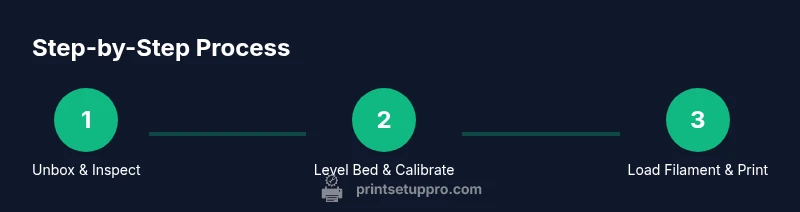
- 1
Unbox and inspect
Carefully unpack the printer and verify all components are present. Check for any shipping damage and remove packing materials. This initial check prevents surprises during assembly and setup.
Tip: Take photos of each step during unboxing to reference if parts are missing later. - 2
Connect power and update firmware
Plug in the printer, connect to a computer or network as required, and install any available firmware updates from the manufacturer.
Tip: Firmware updates can improve reliability and add features like better bed leveling. - 3
Level the build plate
Use the provided tool to bring the nozzle close to the bed at multiple corners and center. Adjust by turning screws until a thin feeler gauge barely fits between nozzle and bed.
Tip: Do a final re-check after the first few prints, as heat can shift the bed slightly. - 4
Load filament and prepare slicer
Load PLA into the extruder, purge a small amount to ensure smooth flow, and configure the slicer with layer height, temperature, and speed settings suited for PLA.
Tip: Start with conservative speeds and a 0.2 mm layer height for reliable results. - 5
Print a calibration object
Print a simple calibration cube or benchy to evaluate dimensional accuracy, bed adhesion, and surface finish. Make notes on any issues observed.
Tip: If first layers peel, adjust bed height slightly and verify nozzle temperature. - 6
Evaluate, tweak, and save settings
Review the first print, tweak flow rate, temperature, and cooling as needed, and store these settings in your slicer profile for future prints.
Tip: Document what worked and what didn’t for quick reference later.
People Also Ask
What is the simplest 3D printer for home use?
An entry-level FDM printer with an enclosed case and auto bed leveling is typically the easiest for beginners. It minimizes setup steps and helps you focus on learning printing basics.
For beginners, start with an affordable, enclosed FDM printer with auto bed leveling to simplify setup.
Is a resin printer safe to use at home?
Resin printers require handling liquid resin and post-processing with cleaning and curing. They emit stronger fumes and require good ventilation and protective safety practices.
Resin printers can be used at home with proper ventilation and safety practices; follow the manufacturer’s guidelines.
What materials can I print at home?
PLA is ideal for beginners. PETG offers durability with easy printing. Higher-temp materials like ABS or nylon require an enclosure and stricter safety handling.
PLA is best to start, then PETG; ABS needs more safety considerations.
How much does it cost to run a home printer?
Costs depend on filament usage, electricity, and maintenance. In general, home printing remains inexpensive for hobby projects and small replacements.
Costs vary with usage, but home printing remains affordable for most hobby needs.
How long does it take to learn 3D printing?
Basic proficiency comes with consistent practice over a few weeks. Expect to spend time learning modeling, slicing, and printer quirks.
You’ll get comfortable after a few weeks of regular printing and experimentation.
Watch Video
Quick Summary
- Choose the right printer type for your home use and space.
- Focus on safety features and community support when selecting a model.
- Calibrate bed leveling and filament flow for consistent first layers.
- Document settings and start with beginner-friendly materials.