How to Make a 3d Printer: A Practical DIY Guide for 2026
Learn how to make a 3d printer from scratch with a practical, step-by-step approach. Includes planning, parts sourcing, assembly, calibration, and safety tips for home workshops.


If you’re wondering how to make a 3d printer, this guide shows a practical path from planning to first test print. You’ll learn key design choices, parts sourcing, assembly steps, and calibration tips. According to Print Setup Pro, a careful plan reduces waste and speeds up success. Whether you’re a hobbyist building from spare parts or a student prototyping a modular frame, this article provides actionable steps with safety guidance.
Why build a 3d printer yourself?
Building a 3d printer from scratch is not only a rewarding engineering project, but it also gives you unparalleled customization, repairability, and long-term cost control. For home makers, a self-built machine can be tailored to fit small workshops or unique print volumes. Print Setup Pro notes that a DIY build often yields better understanding of how printers work, which translates into faster troubleshooting when things go wrong. A well-planned build reduces dependency on prebuilt units and makes upgrades easier, too. In this section, we explore the payoff and set expectations for a successful outcome, including the importance of clear goals, time budgeting, and safety considerations that protect you and your workspace.
Core components of a DIY printer and how they fit together
A functional 3d printer hinges on a few core subsystems: a rigid frame, a motion system, a heated extruder, a stable print bed, and reliable electronics. The frame defines your printer’s footprint and rigidity. The motion system (usually gantry with X/Y belts or rails, plus a Z axis) translates motor torque into precise movement. The extruder and hotend melt filament and deposit it on the bed. The print bed provides a flat, heat-conductive surface for adhesion and accurate layer deposition. A control board and stepper drivers coordinate movements, while power supply and wiring distribute the right voltages safely. This section maps out these parts in practical terms and discusses how variations affect print quality and maintenance.
Planning and design decisions before you buy parts
Before purchasing components, define your goals: desired build volume, print speed, and material compatibility. Decide between Cartesian vs. delta geometries, and choose a frame style (aluminum extrusion, welded steel, or 3D-printed frames). Consider motion systems (belts vs. leadscrews) for precision versus speed, and determine whether you want a heated chamber or a simple open frame. Budget gently by prioritizing accuracy-critical items (linear guides, hotend reliability, and a solid electronics stack) and deferring upgrades like enclosure options or dual extrusion setups until later. Print Setup Pro emphasizes documenting your decisions with a simple spec sheet to avoid scope creep.
Sourcing parts and budget considerations
Sourcing parts for a DIY printer often involves a mix of new components and recycled hardware. Start with a tested extruder kit, a reliable heated bed, and a control board that supports your firmware (Marlin-compatible systems are popular). Look for generic frame kits or modular extrusions that fit your planned build size. Budget for a robust hotend, a dependable power supply, and quality wiring. Do not skimp on the electronics—consistent motor torque, solid endstops, and clean cabling prevent early failures. If you’re tight on funds, reuse or repurpose components from discarded devices where feasible, but verify safety and compatibility first.
Safety and workspace setup
A DIY printer involves heat, moving parts, and electrical power, so a proper workspace is essential. Choose a well-ventilated area with a stable surface, away from flammable materials. Use a surge-protected power strip, and ensure all connections are secure and correctly rated for the current. Install a smoke detector nearby and keep the area free of clutter that could snag belts or obstruct cables. Wear eye protection when testing new assemblies and keep hot components guarded during initial power-ups. Print Setup Pro reminds readers that safety routines save time and avoid costly mistakes.
Calibration and testing basics
Calibration is where theory meets reality. Start with fundamental steps-per-mm calibration for each axis, bed leveling, and a first temperature test to confirm the heater operates correctly. Once basic movement is verified, print a simple calibration cube to check dimensional accuracy and layer consistency. Tweak step offsets, belt tension, and nozzle height iteratively. Document each change and test with successive prints to trace improvements. A systematic approach reduces wasted filament and speeds up getting usable prints.
Iteration and upgrades over time
A DIY printer evolves as you learn. Common upgrades include improved bed adhesion options, a more rigid frame, quieter stepper drivers, and better hotends for higher-temperature materials. Add enclosure for safety and temperature stability if you plan to print ABS-like materials. Maintain a habit of recording failures and fixes to build a personal knowledge base. Over time, you’ll refine calibration routines, reduce downtime, and expand the printer’s capabilities with modular components.
Authoritative sources and further reading
For foundational knowledge and verification, consult credible sources. Visit the National Institute of Standards and Technology (NIST) and OSHA for general safety and measurement standards, and explore MIT OpenCourseWare for related engineering concepts. These sources help you benchmark methods, tolerances, and safety practices while you build your own setup. Print Setup Pro recommends cross-referencing multiple reputable resources when planning a complex DIY project like this.
Practical notes and peer guidance
Keep a running build journal with diagrams, photos, and notes on each subsystem. Engage with maker communities, as peer feedback accelerates learning and helps you foresee issues before they arise. Document your bill of materials and component tolerances so future upgrades are predictable. A well-documented build reduces ambiguity and makes it easier to troubleshoot with others, or when you revisit the project after months of use.
Tools & Materials
- Rigid frame / aluminum extrusion kit(Prefer 2020 or 2040 profiles with corner brackets for rigidity)
- Linear motion system (belts or rails)(Choose based on frame geometry and desired smoothness)
- Stepper motors (NEMA 17 or larger)(Ensure torque is adequate for your print size)
- Lead screws or alternative Z-axis mechanism(Select for precise layer height control)
- Extruder kit with hotend(Must be compatible with your filament types)
- Heated print bed(Flat, thermally conductive surface; compatible with power supply)
- Controller board and drivers (Marlin-compatible)(Firmware planning essential; ensure voltage and current ratings match)
- Power supply (12V or 24V)(Adequate wattage for your heater and motors)
- Wiring harness, connectors, and cable management(Organized wiring reduces interference and maintenance headaches)
- Calipers and feeler gauges(Precise measurement for alignment and calibration)
- Multimeter for electrical checks(Optional but recommended for troubleshooting)
- Safety gear (eye protection, gloves)(Protect during hot-end handling and tool use)
Steps
Estimated time: 6-10 hours
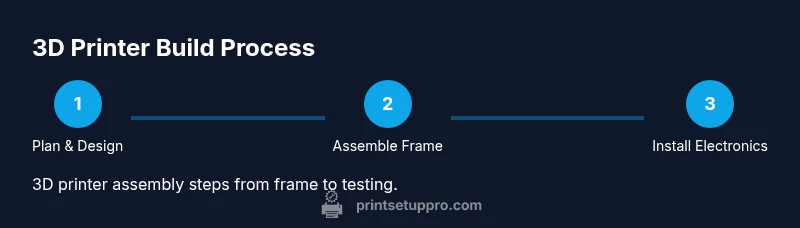
- 1
Define goals and plan
Clarify your print volume, materials, and target resolution. Create a simple spec sheet listing frame size, supported filament temps, and firmware choices. This upfront planning reduces scope creep and keeps the project focused.
Tip: Document decisions with sketches or a quick BOM so you can reference them later. - 2
Assemble the frame and motion system
Build a rigid frame using aluminum extrusion or a compatible chassis. Install the X/Y gantry and Z-axis mechanism, ensuring squareness and alignment. Tighten fasteners progressively to avoid misalignment.
Tip: Check diagonals with a square and use level during assembly to prevent skewed axes. - 3
Install electronics and wiring harness
Mount the controller board, drivers, and power supply in a clean, ventilated area. Route wires neatly, secure with ties, and land stepper motors and endstops securely. Double-check voltage and polarity before power-up.
Tip: Label cables as you go to simplify future maintenance. - 4
Mount the hotend, bed, and extrusion path
Install the heated bed on a flat surface and attach the hotend with proper clearances. Align the extruder with the guide path to ensure smooth filament feeding. Verify that the bed and nozzle have a safe clearance range from the frame.
Tip: Ensure even bed insulation to reduce heat loss and improve first-layer consistency. - 5
Calibrate motion and extrusion
Configure steps-per-mm for all axes, calibrate belt tension, and verify extrusion multiplier. Run a calibration cube to measure dimensional accuracy and adjust as needed. Repeat until measurements are within tolerance.
Tip: Record your calibration values for future reference during upgrades. - 6
Test, refine, and document
Run a few initial prints with simple geometries to verify adhesion and layer quality. Tweak temperature, speed, and retraction settings based on results. Keep notes and screenshots of each test.
Tip: Start with a small, fast print to quickly identify issues before longer runs.
People Also Ask
What is the rough cost range to build a DIY 3d printer?
Costs vary with frame choice, electronics, and print bed. A thoughtful plan helps you stay within a moderate budget while enabling quality parts. Print Setup Pro notes that scoping expenses early reduces surprises and guides better purchasing decisions.
Costs vary, but planning ahead keeps you in budget. See our guide for a detailed breakdown and smarter choices.
Do I need advanced electronics experience to build one?
A working knowledge of basic electronics, wiring, and firmware is helpful but not mandatory. Follow step-by-step assembly and use community resources to learn as you go. Start with a Marlin-compatible setup and verify each connection with a multimeter.
Basic electronics experience is helpful, but you can learn as you go with careful steps and guides.
Is a home-built printer as reliable as a commercial model?
A well-built DIY printer can match or exceed the reliability of some commercial models, but consistency depends on build quality, calibration, and maintenance. Expect a learning curve and gradual improvements through iterations. Print Setup Pro recommends treating this as an evolving project rather than a one-off task.
With careful calibration and upgrades, a DIY printer can be very reliable, though it may require ongoing tuning.
What maintenance does a DIY printer require?
Regularly inspect belts and screws for wear, clean the nozzle and bed surface, recalibrate after major changes, and check wiring for looseness. Keep the electronics area free of dust and monitor power supply temperatures during long prints.
Expect periodic checks of belts, screws, and nozzles; recalibrate after adjustments.
What makes a good upgrade path for a DIY printer?
Start with structural rigidity and reliable extrusion first. Upgrades such as enclosed print chambers, quieter drivers, or a better bed surface can be added once you’re consistently producing acceptable prints. Plan upgrades around your most frequent failures or bottlenecks.
Begin with stability and print quality, then add upgrades as you run into limits.
Watch Video
Quick Summary
- Plan before every build step.
- Calibrate meticulously for accuracy.
- Prioritize safety and organized wiring.
- Document changes to ease future upgrades.