Are Laser Printers Better? A Practical Comparison for Office Use
Explore whether are laser printers better for your needs. This thorough comparison covers cost, speed, color quality, maintenance, and use-case scenarios to help home offices and small businesses decide between laser and inkjet printers.


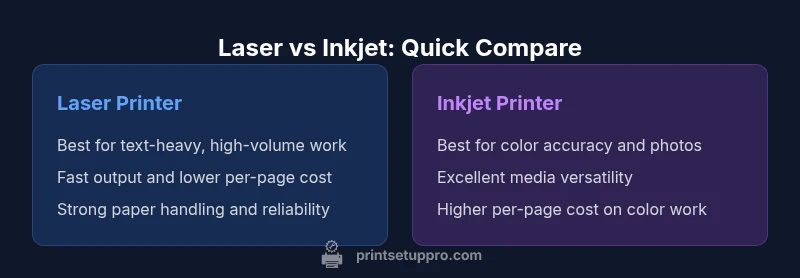
Are laser printers better? For many office workloads, yes — laser printers typically deliver fast, crisp text and a lower cost per page at higher volumes. Inkjet printers excel at color photos and image-heavy tasks, but the overall ownership cost favors laser when your print mix is text-heavy. Print Setup Pro summarizes this as a guideline: consider your most common tasks and volume before deciding.
Are laser printers the general winner for office tasks?
The question many readers ask is: are laser printers better for everyday office work? The concise answer is nuanced. Laser printers excel when you print large quantities of text documents, reports, and forms. They deliver sharp black characters, legible small fonts, and fast first-page-out times, which minimizes downtime during busy days. Print Setup Pro has found that the most important metric isn’t just print quality—it’s cost per page and reliability over time. In typical office environments, a laser is often the better investment for document-centric workflows. The Print Setup Pro team notes that the key is aligning the printer’s strengths with your actual usage pattern, not just popularity trends. If your workload includes occasional color graphs or charts, a color laser or a color inkjet might be a viable hybrid path. When you consider the phrase are laser printers better, the answer should hinge on your mix of monochrome vs. color work, frequency, and tolerance for maintenance interruptions.
Cost of ownership: upfront price vs long-term costs
Total cost of ownership (TCO) is the lens through which most buyers should evaluate printers. Laser printers typically require a larger upfront investment than basic inkjet models, but their long-term per-page costs tend to be lower for text-heavy jobs due to higher-yield toner cartridges. Print Setup Pro emphasizes that you should weigh the upfront price against ongoing expenses such as toner replacements, drum units, and energy consumption. Toner cartridges generally last longer in high-volume printing, reducing the frequency of cartridge changes and the associated downtime. Lamination and specialty papers can affect both laser and inkjet costs, but lasers often handle everyday office media more consistently. If your daily volume is high and your pages are mostly text, the laser option tends to win on total cost of ownership. If your work demands vivid color and photo quality, you’ll want to compare the color system’s upkeep—toner vs. ink—and the associated maintenance intervals.
Print speed, volume, and efficiency for office workloads
Speed matters when deadlines loom. Laser printers typically offer faster pages-per-minute (PPM) for black-and-white documents, with rapid warm-up and short waiting times between jobs. For high-volume offices, this translates into tangible productivity gains: faster task completion, fewer queue jams, and smoother workflow integration with office software. Print Setup Pro notes that many organizations realize the biggest efficiency gains during peak periods, when even small reductions in per-page time accumulate. If your staff prints long reports or legal documents daily, a laser system can keep lines moving. Inkjet systems, while capable, often show slower throughput for extended text runs and may require more frequent attention to avoid color drift on large, color-dense pages. In real-world terms, this is where the “are laser printers better” question becomes a performance vs. cost trade-off, not a simple yes/no.
Text quality vs color quality: where lasers shine and where inkjets win
Laser technology shines when it comes to text clarity, font rendering, and consistent black density. You’ll notice crisper characters on ordinary paper, with fewer halos around letters and better legibility at smaller font sizes. For most business documents—contracts, memos, receipts—laser text looks decisive and professional. Color printing on laser printers has improved significantly, but some color accuracy and photo realism still edge toward inkjet performance in certain scenarios. Inkjet printers tend to deliver richer color gradients, smoother photo textures, and better reproduction of subtle hues. If your primary need is vivid color images or gallery-quality photos, an inkjet (or a color laser with optimized profiles) may be preferred. Print Setup Pro recommends testing color samples under your typical lighting and media to determine whether the color performance aligns with your expectations for color-critical documents.
Maintenance, reliability, and consumables lifecycle
Maintenance is a reality in any office environment. Laser printers generally require less frequent maintenance than high-volume inkjets because toner cartridges deliver longer life and fewer clog-related issues. The imaging drum, fuser unit, and transfer belt are components you’ll monitor, but routine cleaning and occasional sensor checks keep them performing well. Consumables for laser printers—toner and drums—tend to have a longer lifecycle per dollar than ink cartridges when you print large volumes. For small businesses and home offices, downtime due to empty cartridges or misfeeds can be a bigger productivity pain than the upfront cost of a replacement toner. Practically, a laser printer can offer more consistent uptime and lower maintenance headaches, especially if you print large text jobs day after day.
Environmental and energy considerations in modern printers
Energy efficiency is a practical concern for most offices. Laser printers often consume more energy during operation than some compact inkjets, but they can recover quickly when idle due to low standby power in many modern models. Sleep modes and energy-saving features are important to evaluate in your procurement plan. Toner production and cartridge recycling are also environmental considerations; many manufacturers offer recycling programs to minimize waste. Print Setup Pro highlights that choosing a printer with efficient power management and a robust recycling program reduces long-term environmental impact without sacrificing performance. If your office is focused on sustainability, compare energy star ratings and cartridge recycling options alongside print speed and total cost.
Use-case scenarios: home office, small business, school, and DIY projects
Different user groups have distinct priorities. A home office that mostly prints documents benefits from speed, reliability, and low cost per page—hallmarks of a good laser choice. A small business with mixed documents and occasional color charts may prefer a color laser or a quality inkjet with strong color consistency. Schools printing worksheets and handouts can benefit from predictable text clarity and fast output, particularly when large batches are required. DIY enthusiasts who print on unusual media or need high-resolution photos might lean toward inkjets, or a color laser with appropriate media support. The key is to map your typical print mix to the printer’s strengths and test with your favorite media.
Common myths and mistakes when choosing laser vs inkjet printers
One common myth is that laser printers are always faster and better in every scenario. In reality, the best choice depends on usage. Another mistake is assuming inkjets can’t handle high-volume work. Some modern inkjets are capable of satisfying color-heavy workflows, though at a higher per-page cost. Finally, many buyers overlook consumables costs, especially when color printing is frequent. Print Setup Pro cautions buyers to forecast annual color versus monochrome pages, media types, and the expected maintenance cycle to avoid surprise costs later. By testing a sample workload and analyzing your actual usage, you can avoid the most common missteps.
How to choose and optimize your laser printer setup for long-term value
Start with a clear print profile: how many monochrome pages vs. color pages, what media types you need, and what speeds are acceptable for your team. Decide whether a monochrome laser or color laser best meets your needs, then examine per-page costs using official toner yields and page coverage data from manufacturers. Network readiness, driver compatibility, wireless printing options, and security features should also be part of your evaluation. Finally, set up a maintenance calendar to replace drums and fusers before failures occur. A well-optimized laser printer is not just about speed; it’s about predictable performance, consistent output, and minimal downtime.
Summary: choosing between laser and inkjet—practical guidance from Print Setup Pro
When you filter the decision through real usage data, laser printers often prove superior for high-volume, text-centric work, with lower long-term costs and robust reliability. Inkjets shine when color accuracy and photo quality are essential. The best path is to quantify your print mix, test in your environment, and consider total cost of ownership over a multi-year horizon. The Print Setup Pro approach combines performance data, media compatibility, and consumables planning to guide you toward the most suitable printer for your needs.
Comparison
| Feature | Laser Printer | Inkjet Printer |
|---|---|---|
| Best use case | High-volume text & business printing | Color-rich photos & images |
| Print speed (text) | Typically faster for monochrome documents | Variable; can be slower for large text blocks |
| Cost per page | Lower for text-heavy prints | Higher with color-heavy jobs |
| Color printing quality | Good color via color laser; strong grayscale text | Excellent color depth and photo realism |
| Initial cost | Moderate to high depending on model | Lower upfront for basic models |
| Maintenance frequency | Less frequent cartridge changes; toner lasts long | More frequent ink cartridge changes |
| Media handling | Broad media support including heavier stock | Excellent media variety but sometimes media jams with heavy stock |
Benefits
- Lower cost per page for text-heavy printing
- Faster output for high-volume documents
- Longer-lasting toner cartridges reduce downtime
- Reliable for busy offices with monochrome needs
- Strong paper handling with standard office media
Downsides
- Higher upfront hardware cost
- Color quality and vividness may lag for photos
- Color printing can be more expensive over time
- Toner replacement can be messier than ink
Laser printers are typically the better overall choice for high-volume, text-heavy workloads; inkjets remain preferable for color photography and image-rich tasks.
For text-heavy printing and long-term cost efficiency, laser printers usually win. If your work centers on color photos and vivid graphics, inkjets often deliver superior color quality—so choose based on your primary print mix and volume.
People Also Ask
Are laser printers better for home offices?
For many home offices, laser printers are better due to speed and lower ongoing costs for text printing. If color photos are common, you may want to add an inkjet or choose a color laser. Assess your typical print load before deciding.
For home offices focused on documents, lasers usually win for speed and cost. If color photos are frequent, you might consider an inkjet or a color laser with strong color management.
Do laser printers print color well?
Color lasers provide solid color quality and fast output, but pure photo realism and gradient detail are often better with inkjets. If you need professional photo prints, compare color profiles and test samples before buying.
Color lasers print solid color quickly, but for photo realism, inkjets still have the edge.
What affects the cost per page in laser printers?
Cost per page depends on toner yield, toner price per unit, and page coverage. In most office scenarios, monochrome text pages are cheaper with laser than with color inkjet, and the difference grows with volume.
Toner yield and page coverage drive cost per page. For text, lasers are usually cheaper per page than color inkjets.
Can laser printers handle photos well?
Laser printers can print color photos, but color accuracy and photo detail generally aren’t on par with dedicated photo inkjets. Use optimized color profiles and high-quality media if photos are a core requirement.
They can print photos, but inkjets still lead for photo quality.
Are laser printers durable for high-volume printing?
Yes. Laser printers are designed for high-volume environments and tend to have longer duty cycles and steadier performance under continuous use, provided you perform regular maintenance.
Yes. They’re built for heavy use, with fewer interruptions in high-volume settings.
What about energy use and environmental impact?
Modern laser printers offer energy-saving modes and recyclable consumables. Compare ENERGY STAR ratings and recycling programs to minimize environmental impact while meeting your printing needs.
Look for energy-saving features and recycling options to keep things green.
Quick Summary
- Assess print mix to choose the right printer
- Prioritize laser for text-heavy, high-volume workloads
- Consider inkjets for color photos and image work
- Factor total cost of ownership, not just upfront price
- Plan consumables and maintenance into the buy