Is Laser Printer Better or Inkjet? A Practical Comparison
A thorough, evidence-based comparison of laser vs inkjet printers for home offices and small businesses. We analyze cost per page, speed, color quality, media handling, and reliability to help you decide which technology fits your needs.


Laser printers usually win for speed and ongoing text printing costs, while inkjets excel at color accuracy and photo quality. If you mostly print documents, a laser saves time and money; if you need vibrant graphics, an inkjet may be better. Print Setup Pro analysis shows lasers typically offer lower cost-per-page and faster first pages for text-heavy workloads.
How to approach the laser vs inkjet question in a home office
If you’re wondering is laser printer better or inkjet for your setup, start with your typical tasks, print volume, and color needs. This decision affects long-term costs, maintenance, and the day-to-day ease of printing. In practical terms, you’re choosing between a technology that excels at text efficiency and a device that shines with color and media versatility. The question isn’t whether one is universally better; it’s which aligns with your workload and budget. According to Print Setup Pro, framing the choice around workload type, rather than brand names, leads to better long-term satisfaction. This guide will help you map your needs to laser or inkjet features, from page yields to media support, in clear, actionable terms. For students, home offices, and small businesses, the right pick can streamline workflow, reduce interruptions, and lower total printing costs over time.
In the sections that follow, you’ll see practical criteria you can apply now—cost considerations, print quality for documents and color graphics, media flexibility, reliability, and ecosystem compatibility. The goal is to empower you to make a choice that matches how you print, not how you wish you printed. You’ll also find a structured comparison table and a verdict tailored to common use cases so you can act with confidence.
Quick Snapshot: Core differences at a glance
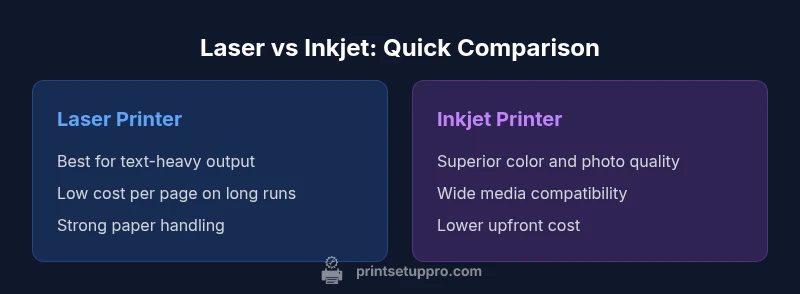
Choosing between laser and inkjet hinges on three practical axes: print volume, color needs, and total cost of ownership. - Laser printers excel at high-volume text printing with low ongoing costs per page and fast output for large jobs. - Inkjet printers shine where color quality and media versatility matter, including photos and heavy color graphics. In mixed-use scenarios, you’ll often balance the laser’s efficiency against the inkjet’s color capability. Print Setup Pro’s research emphasizes that the decision should be task-driven rather than brand-driven, especially for home offices that juggle documents and visuals. For many, a laser is the sensible baseline for text-heavy tasks, while an inkjet becomes compelling when color and photo output dominate the workload. If you print infrequently, an all-in-one model with inkjet or laser features can also help you minimize waste while keeping your setup flexible.
From a practical standpoint, consider your monthly page volume, the ratio of black-and-white to color pages, and whether you need glossy photo prints. The right choice also depends on the type of media you commonly use—plain paper, envelopes, labels, or photo paper. A quick audit of your typical print jobs will reveal whether you should prioritize speed and cost per page (laser) or color fidelity and media flexibility (inkjet).
Print Quality: Text, Color, and Photo Performance
The core difference between laser and inkjet printers is not simply “black and white vs color,” but how each technology translates text clarity, color accuracy, and photo reproduction. Laser printers typically render sharp, crisp text with consistent density across the page. Their toner-based output tends to remain legible on various paper weights, and the long-term durability of toner means documents resist smudging and fading. Inkjet printers, by contrast, deposit color droplets directly onto the paper. This often yields richer color for graphics and more natural skin tones in photos, but can suffer from color bleed or slight shifts if the paper isn’t ideal or if the cartridge is running low.
For home offices that prioritize professional text documents, laser’s high-contrast text and toner longevity translate into a more polished look across thousands of pages. If your workflow includes marketing materials, charts with vivid color, or family photos, inkjets can deliver more nuanced color and better image fidelity. Print Setup Pro recommends evaluating your typical page mix and testing sample documents if possible. In practice, many users maintain a laser printer for text-dense tasks and keep an inkjet on hand for occasional color graphics or photo printing. This hybrid approach minimizes compromises and helps you tailor output to each job type.
Another nuance is grayscale printing from color laser printers. Some laser devices can produce grayscale prints with smooth gradients, which is beneficial for drafts and proofreading. However, for true photo-quality output, some users still prefer an inkjet with a wider color gamut and more consistent color blending. When deciding, review the printer’s color management features, such as ICC profiles and built-in color correction, as these play a significant role in the final result. Overall, the choice of laser versus inkjet should be aligned with your primary output goals—document clarity vs. color richness.
Speed and Throughput for Real-World Workflows
In everyday use, speed isn’t just about pages per minute; it’s about the time saved during a workday. Laser printers are designed to handle large text documents quickly, often with fast warm-up times and rapid first-page-out speeds. This can translate into a smoother workflow when you’re printing tight deadlines, long reports, or batch mailing materials. For color-heavy jobs, inkjets may still produce fast color prints, but their larger file processing and ink replacement intervals can introduce intermittent pauses. In practice, the laser’s advantage becomes most noticeable when printing hundreds or thousands of pages in a single day, or when you need to avoid bottlenecks caused by frequent cartridge changes.
If your typical print loads involve frequent job spooling, multi-page PDFs, or daily multi-document tasks, consider a laser model with high-capacity trays designed for continuous output. On the other hand, if your daily routine requires quick, vibrant color proofs or image-heavy materials, you’ll want to factor in the inkjet’s faster color ramp and consistent photo quality. A key takeaway is to align speed expectations with job type: laser for volume and speed on text; inkjet for flexible color and presentation-ready images. Print Setup Pro’s guidance is to map your real-world tasks to these strengths for a more precise forecast of how each option will perform in your environment.
Upfront Costs and Long-Term Value
Initial sticker price is a common source of decision fatigue. Laser printers designed for small offices or home use often carry a higher upfront cost than budget inkjets, particularly for color-capable laser models. However, the long-term value shifts in favor of lasers for text-based workloads because toner cartridges tend to yield more printed pages per dollar and have a longer shelf life than typical ink cartridges. You’ll also notice fewer maintenance breaks linked to clogged print heads or dried ink in color-heavy tasks. When evaluating total cost of ownership (TCO), consider not only the price of the device but also the expected monthly print volume, typical color vs monochrome mix, and the availability of high-yield toner or cartridge options. Print Setup Pro’s analysis shows that many organizations recoup the higher upfront cost of a color laser or a color-capable mono laser through lower per-page costs and reduced downtime over a few years.
For students or hobbyists with lighter workloads, an entry-level inkjet often provides a gentler ramp-up in price and a broader range of media compatibility at the outset. If you anticipate scaling up with time, a future upgrade path from a versatile inkjet to a color laser could also be part of a longer-term plan. Think in terms of a two-to-three year horizon for major upgrades; this is where the cost structure tends to become most meaningful. By forecasting your typical print load and color requirements, you’ll have a clearer view of whether you should prioritize the laser or the inkjet path now and when a future transition may be worthwhile.
Media Handling, Paper Types, and Special Media
Media handling capacity often drives the decision more than people expect. Laser printers generally excel with plain printer paper, multipurpose papers, and high-volume workloads, and they often support a wider range of media weights and finish options. While some inkjets also boast robust media handling, laser devices frequently offer faster manual feed, better tray organization, and improved performance with heavier stock. If your use case includes envelopes, labels, or card stock, verify the printer’s supported media sizes and paper paths. In many environments, the laser’s reliability with heavy stock and its ability to dry toner quickly reduces smearing and time-consuming reprints. Inkjets, however, tend to handle glossy photo papers and specialized media with higher color fidelity.
From a practical standpoint, buyers should list their most-used media types and check compatibility requirements for your preferred brands. You’ll also want to measure the cost and availability of compatible media. If your typical workflow includes a mix of documents and marketing collateral with glossy finishes or vibrant color panels, an inkjet with a wide media range can reduce hand-offs between devices. Print Setup Pro suggests evaluating both current and anticipated media needs to prevent bottlenecks or frustrating print failures. This is especially important for small businesses that ship colored, label-bearing, or presentation-heavy documents.
Reliability, Lifespan, and Maintenance
Reliability is the backbone of any printer investment. Laser printers are known for durable output and longer toner lifespan, which translates to fewer cartridge changes in high-volume environments. That durability also tends to reduce maintenance complexity because toner does not dry out as ink can in the right atmospheric conditions. Inkjet printers, while often lower in upfront cost, require more frequent cartridge changes in color-heavy workflows and can be more sensitive to clogged print heads if prints are infrequent. Energy efficiency is another factor; modern printers across both technologies often include sleep modes and power-saving features that reduce operating costs over time. The key is to estimate your monthly page volume and color usage, then choose a device whose maintenance cadence fits your workday.
To maximize longevity, adopt a routine: clean the paper path periodically, update firmware to keep compatibility with updated drivers, and store spare cartridges or toner in a mothball-friendly environment. For shared office setups, consider a maintenance agreement or a service plan that covers parts and routine calibrations. A proactive approach to maintenance reduces downtime and can extend the useful life of your investment, especially in demanding home office or small business settings where printing is central to daily operations.
Connectivity, Software, and Ecosystem
In today’s print environments, connectivity matters as much as print quality. Most modern laser and inkjet devices offer a mix of USB, Ethernet, and wireless capabilities, plus mobile printing support via apps, cloud printing, and driver compatibility with multiple operating systems. Inkjets, historically favored for home use, have evolved to include robust networking features and cloud print options, making it easy to print from laptops, tablets, and smartphones. Laser printers, with enterprise-grade options, frequently provide faster wireless print performance and stronger compatibility with business networks, alongside secure print and password-protected access. When your workflow includes shared devices, consider features such as pull printing, user authentication, and device management options. If you rely on remote printing or batch operations, a printer with strong cloud service integration and straightforward firmware updates reduces friction and keeps you productive.
Security is another dimension to assess. Some laser printers incorporate built-in hard drive security for sensitive documents, while many inkjets focus on straightforward, user-friendly experiences. Evaluate your risk tolerance and regulatory needs to decide how much security matters for your use case. Print Setup Pro emphasizes that connectivity choices should align with your daily routine and device management plan—especially for homes or small offices where multiple devices share a network.
Decision Framework: How to choose based on your use case
The most reliable way to decide is to map your actual work profile into a decision framework. Start by categorizing your typical output into three buckets: text-heavy documents, color graphics, and photos. If your daily workload is dominated by black-and-white reports, invoices, and long form manuscripts, a monochrome laser printer is a strong baseline choice. If your output includes marketing materials, client-ready color visuals, or family photos, inkjet protection against color drift during long print runs can be valuable. For mixed use, you might consider a color laser if you anticipate growing your color output or a premium inkjet with strong color and media flexibility if your color work is occasional but important.
Next, quantify costs. Estimate monthly page counts for black-and-white and color pages and multiply by the likely cartridge or toner costs. Couple this with your upfront investment tolerance and consider the total cost of ownership over two to three years. The reliability of your chosen platform also matters; laser devices often provide a more predictable rhythm for high-volume printing, whereas inkjets can deliver superior color fidelity for creative output when used regularly. Finally, test drive if possible. Many retailers offer demo units, or you can borrow a test unit from a friend. A hands-on trial can reveal how the printer handles your day-to-day tasks and whether your color needs align with the device’s strengths.
Common Myths vs Reality
There are a few enduring myths about laser versus inkjet printing that can mislead buyers. Myth one: lasers are always faster than any inkjet. Reality: while lasers excel at text and large-volume jobs, some high-end color inkjets deliver competitive speed on color graphics. Myth two: lasers are always more expensive to run. Reality: for text-heavy printing, laser cost-per-page can be substantially lower, whereas high-color workloads can tilt costs toward inkjets depending on cartridge yields and usage patterns. Myth three: inkjets cannot handle heavy paper or labels. Reality: many inkjets support a wide range of media types, though you should verify the media specs for your specific model. By debunking these myths, you gain a clearer view of what matters for your environment and avoid overgeneralizing about the technology.
Budget Planning, Tips, and Final Checks
A practical budgeting approach begins with a needs assessment and a side-by-side comparison of two or three models that fit your criteria—volume, color requirements, and media needs. Request quotes that include high-yield options, a realistic monthly page estimate, and potential upgrade paths if your needs shift. Consider total cost of ownership by factoring in toner or ink costs, maintenance supplies, and power usage. Check for warranty terms, service options, and firmware update policies, as these impact long-term reliability and performance. Finally, plan for future-proofing your setup: if you anticipate significant growth in color output or a need for advanced security features, investing in a mid- to high-end model now may save time and money later. A methodical approach will help you avoid overpaying for features you won’t use while ensuring you have the capabilities you need as your printing demands evolve.
Comparison
| Feature | Laser Printer | Inkjet Printer |
|---|---|---|
| Best Use Case | High-volume text, low cost per page | Color graphics and photo output |
| Print Quality (Text/Graphics) | Crisp text, strong contrast; steady, uniform output | Rich color, smooth gradients; best photo quality |
| Speed | Very fast for text-heavy documents | Good color speed; varies by model |
| Cost per Page | Low to moderate for text; high-yield options available | Higher for color; cost varies with cartridge capacity |
| Media Handling | Wide range of weights; strong for plain paper | Excellent for photo paper and glossy media |
| Upfront Cost | Moderate to high for color-capable laser | Lower for basic inkjets |
| Reliability & Maintenance | Low maintenance; toner lasts long | Head clog risk; cartridges require regular changes |
Benefits
- Lower cost per page for text-heavy work
- Fast output reduces waiting time
- Longer-lasting toner improves reliability
- Strong paper handling for varied media
Downsides
- Higher upfront cost for color-capable models
- Inkjet color and photo quality can exceed laser in visuals
- Toner disposal considerations in some regions
Laser is the go-to for text-heavy work; inkjet wins for vibrant color and photos
Choose laser if your priority is speed and low per-page costs for documents. If color accuracy and photo quality are essential, inkjet is the better fit. For many users with mixed needs, a laser for text and an inkjet for color provides the best of both worlds.
People Also Ask
Is a laser printer better for home offices than an inkjet?
For text-heavy documents and high-volume workloads, lasers generally offer faster throughput and lower operating costs. If your daily tasks include color graphics or photos, an inkjet can provide superior color and media versatility. Your decision should hinge on your primary tasks and print volume.
For home offices that print mostly text, a laser printer is usually the better choice. If you need vibrant color graphics and photos, an inkjet might be the way to go.
Which printer is cheaper to run over time?
Text-heavy printing typically favors laser printers due to lower cost per page and longer-lasting toner. For color-heavy printing, inkjets may have comparable running costs if you choose high-yield color cartridges and print less frequently.
Laser often costs less per page for text. For color printing, it depends on cartridge yields and usage.
Can laser printers handle color printing well?
Color laser printers exist and perform well for business graphics, charts, and presentations, but they generally don’t match the photo quality of high-end inkjets. If your color needs are mainly documents and charts, a color laser can suffice; for photo-heavy work, inkjets typically win.
Color lasers are great for graphs and colored docs, but inkjets usually beat them for photos.
What maintenance differences should I expect?
Lasers require toner replacements and occasional drum unit replacements; maintenance tends to be less frequent. Inkjets require more frequent cartridge changes, potential nozzle cleaning, and occasional print head care, especially if prints are infrequent.
Lasers need toner layers and rare drum checks; inkjets need more frequent cartridge changes and head cleanings.
Are there energy or environmental considerations?
Many models offer energy-saving modes and efficient standby power. The environmental impact depends on consumption patterns, cartridge disposal, and recycling options in your area. Consider these factors alongside print needs.
Energy-saving modes help. Check local cartridge recycling options to minimize environmental impact.
Which should a student choose for a dorm room setup?
If most prints are text-based assignments, a compact color inkjet or monochrome laser can serve well; if you do frequent color reports or graphics, an inkjet with good color output is advantageous. Ensure quiet operation and a size that fits a small space.
For a dorm, pick based on your balance of text needs and color graphics; inkjets are common for color, while lasers excel at text.
Quick Summary
- Define primary tasks before choosing
- Estimate long-term cost per page for typical loads
- Assess color needs and media flexibility
- Balance upfront price with ongoing maintenance