Printer or Copier: A Practical Comparison Guide for 2026
An objective, in-depth comparison of printers and copiers to help home offices, students, and small businesses choose the right device for on-demand printing or high-volume duplication.


Printer or copier decisions hinge on workload, space, and total cost of ownership. For high-volume duplicates in a busy office, a standalone or multifunction copier can excel, but for flexible, on-demand printing with color options, a modern printer or MFP is typically best. This guide breaks down the differences, costs, and scenarios to help you choose confidently.
What the term printer or copier really means for your space
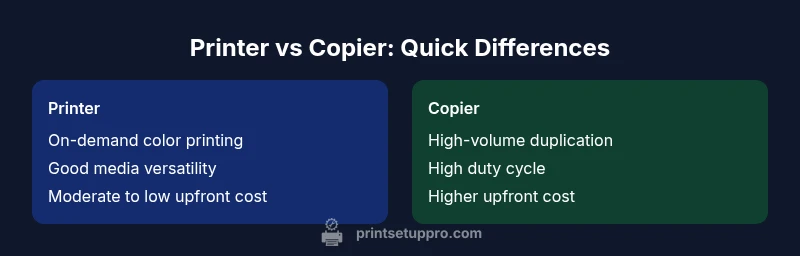
In everyday use, the two terms describe different core capabilities. A printer is primarily designed for on-demand document production, often offering color printing, flexible media handling, and broad network sharing. A copier focuses on rapid duplication of existing documents, with high-duty cycles and streamlined paper handling optimized for bulk copies. Most offices today lean toward multifunction printers (MFPs) that blend printing, scanning, copying, and sometimes fax in a single device. If you’re choosing for a home office or small business, the distinction matters for workflow, space, and total cost of ownership. According to Print Setup Pro, identifying your main tasks—color photos, reports, forms, or bulk copies—helps you select the right model and features. The best decisions come from aligning day-to-day tasks with a device’s strengths, not chasing every new buzzword.
Core differences: speed, cost, and output quality
Speed, cost per page, and output quality are the big levers when comparing a printer to a copier. Printers (especially laser printers) often excel at monochrome speed and efficiency, while color inkjets can deliver vibrant photos but may incur higher page costs. Copiers emphasize fast duplication, robust paper handling, and minimal intervention for large batches. An MFP blends both worlds but may sacrifice the peak speed of a dedicated copier or the color depth of a high-end printer. For small teams, the trade-off is usually worth it if you value convenience and space savings. Print Setup Pro notes that workflow complexity—like frequent scanning, cloud printing, or duplexing—can shift the balance toward MFPs or dedicated copiers depending on volume.
Operational costs: ink/toner, maintenance, and service
Running costs are a critical factor. Ink costs for color printers can add up quickly if you print many photos or marketing materials, while toner for laser printers tends to be cheaper per page but may require more upfront investment. Copiers typically have higher maintenance needs over time due to their hardware complexity and higher duty cycles. Regular servicing and proper media selection can reduce downtime and extend device life. The total cost of ownership (TCO) should include consumables, maintenance contracts, and potential downtime costs, not just the sticker price. Print Setup Pro recommends calculating expected monthly pages and multiplying by the page cost to compare alternatives fairly.
Feature sets: scanning, duplexing, and connectivity
Modern devices offer a spectrum of features beyond printing: duplex (two-sided) printing, scanning with OCR, automatic document feeders (ADF), and cloud or mobile printing compatibility. If your use case includes digitizing documents, a strong scanning feature is essential. If you need fast bulk copies, ensure the device has a high-capacity ADF and robust paper handling. Networking capabilities—Wi‑Fi, Ethernet, and cloud services—determine how easily devices fit into a home network or small office. When choosing between a printer or copier, consider whether you need secure printing, mobile print from devices, or integration with document workflows. A thoughtful feature set can reduce friction and improve productivity over time.
Total cost of ownership: budgeting for a home office vs small business
For individuals or students, a lower upfront price with reasonable per-page costs can be ideal. For small businesses, the decision often hinges on volume and reliability rather than initial cost alone. Copiers tend to require greater upfront investment but may offer lower long-term per-page costs in high-volume scenarios. Printers and MFPs can be more affordable initially but come with ongoing ink or toner costs that scale with usage. When assessing options, model long-run costs, warranty terms, and service levels. Print Setup Pro emphasizes comparing not just sticker price but also expected maintenance and downtime in real-world usage.
Setup and network considerations: getting everyone on the same page
Networked devices simplify sharing in a home office or small team. Look for easy setup wizards, secure guest access, and compatibility with your operating system. If you rely on mobile printing, ensure the device supports native iOS/Android printing and popular apps. For a copier-centric workflow, confirm integration with scanning destinations (email, folders, cloud storage) and robust, centralized management options. Proper configuration reduces print queues, conflicts, and downtime, enabling smoother daily operations.
Scenarios: when a printer is better, when a copier is better
If your workload centers on on-demand color printing, document production, and occasional bulk copies, a modern printer or MFP is usually the better fit. If your primary need is high-volume duplication, with minimal requirement for on-demand detail, a dedicated copier can offer faster throughput and lower per-page costs. For many users, an MFP provides a balanced solution, combining printing, scanning, and copying in a single device. The choice should reflect the volume, color requirements, and required document workflows you manage in your space.
Practical buying guide: evaluating specs and vendor support
Start with core specs: print speed (ppm), color capability, and duty cycle, then evaluate media handling (paper sizes, weights), input/output capacity, and supported paper types. Check driver support and compatibility across your devices, and consider vendor support, warranty terms, and service reach. Review energy efficiency ratings and noise levels for quiet environments. A simple decision tree: if you print a lot of color photos, prioritize high-quality color and versatile media; if you copy hundreds of pages weekly, prioritize speed, reliability, and cost per page.
Maintenance and troubleshooting basics you can implement today
Regular maintenance reduces downtime. Clean paper paths, check for paper jams, replace consumables only when numbers justify it, and update firmware to fix bugs and improve reliability. Keep a basic spare of toner or ink and a set of common replacement parts. Establish a routine for cleaning rollers and ensuring the ADF is free of dust. For network issues, verify device IP addresses and driver settings. Simple, proactive care saves time and money over the device’s life.
Common mistakes and how to avoid them
Avoid choosing based on initial price alone; consider long-term costs and reliability. Don’t ignore compatibility with your computer, mobile devices, and cloud services. Don’t overlook paper handling and media requirements for your typical documents. Finally, avoid underestimating the space needed for a copier’s bulkier footprint or the need for ventilation in high-volume environments. A careful, needs-based evaluation prevents costly missteps.
Feature Comparison
| Feature | Printer | Copier (standalone) | Multifunction Printer (MFP) |
|---|---|---|---|
| Speed (ppm) | Low-moderate (5-25) depending on color or laser | Moderate-high (20-60+) depending on engine | Moderate-high (15-60+) varies by model |
| Cost per page | Low to moderate, varies by color/ink type | Higher for high-volume toners in bulk | Balanced, depends on print mode and media |
| Initial price range | $100-$400 | $2,000-$6,000+ | $300-$1,500 |
| Best for | Occasional color printing and home use | High-volume bulk copying in office settings | Balanced printing, copying, scanning in one device |
| Maintenance frequency | Low to moderate | High for heavy-duty use | Moderate |
| Paper handling | Lower-capacity trays | Industrial-capacity feeding for copies | Higher-capacity with ADF options |
| Connectivity | USB, Wi-Fi | Networked, sometimes legacy interfaces | Wi-Fi, Ethernet, cloud printing |
| Duty cycle / durability | Low to moderate for home use | Very high in office environments | Varies by model; generally robust |
Benefits
- Lower upfront cost for basic models
- Versatile options with MFPs for all-in-one needs
- Wide range of media support and connectivity
- Easier to upgrade in smaller steps as needs grow
Downsides
- Ongoing ink/toner costs can be high with color printing
- Copiers have higher upfront investment and maintenance
- Bulk copying devices take more space
- Per-page costs can be unpredictable with some models
Printer-focused setups win on flexibility; copiers win on speed for high-volume copying
Choose a printer or MFP if you need on-demand color and versatile workflows. Opt for a standalone copier if your primary need is rapid bulk duplication at a lower per-page cost.
People Also Ask
What is the fundamental difference between a printer and a copier?
Printers are optimized for on-demand printing with broad media support and color options, while copiers excel at rapid duplication of existing documents with high-volume throughput. Multifunction devices blend both capabilities along with scanning and sometimes fax.
Printers print on demand with color options; copiers copy fast for bulk tasks. Multifunction devices combine both, plus scanning.
Do I need scanning and cloud features to justify an MFP?
If you routinely convert paper documents to digital copies or need easy sharing to cloud storage, a device with scanning and cloud features adds real value. For simple printing tasks, a basic printer may suffice.
If you digitize papers or share scans often, an MFP with scanning helps a lot.
Can a printer handle high-volume copying effectively?
Typical home printers aren’t optimized for high-volume copying. For heavy bulk copying, a copier or high-end MFP designed for bulk tasks is usually better due to higher duty cycles and faster throughput.
Bulk copying is better handled by a copier or bulk-capable MFP.
Which is cheaper to operate long-term, printers or copiers?
Long-term costs depend on usage. Printers with affordable toner can be cheaper per page at high volumes, but color printing can raise costs. Copiers often offer lower per-page costs at scale, especially for monochrome copies.
Cost per page depends on toner, ink, and duty cycle; bulk copiers can be cheaper per page at scale.
Is a laser printer better than an inkjet in a home office?
Laser printers typically provide faster monochrome output and lower running costs for text-heavy documents. Inkjets are excellent for color and photos but may incur higher per-page costs.
Laser is fast for text; inkjet is great for color but costlier per page.
What maintenance steps are crucial for reliability?
Keep the paper path clean, update firmware, replace consumables on schedule, and run test pages to prevent clogs or printhead issues. Regular servicing improves uptime.
Clean the path, update firmware, and replace consumables on schedule.
Quick Summary
- Assess workload before buying: on-demand vs bulk copying
- Calculate total cost of ownership, not just sticker price
- Prioritize features that align with your workflows
- Consider space, network needs, and maintenance