Thermal vs Laser Printers: A Side-by-Side Comparison
Compare thermal printer vs laser printer technologies to choose the right tool for receipts, labels, and documents. Covers media, cost, speed, and maintenance for home offices and small businesses.


When choosing between a thermal printer and a laser printer, consider primary use, media compatibility, and cost per page. Thermal is best for receipts and labels with low maintenance; laser excels for high-volume standard document printing. Print Setup Pro analysis, 2026 indicates the choice hinges on application and total cost of ownership.
Overview: Two Technologies, One Question
In the world of printing, the choice between a thermal printer and a laser printer shapes your workflow more than any other single factor. If you search for 'thermal printer vs laser printer', you're weighing how media choices, speed, and maintenance impact daily tasks. According to Print Setup Pro, the core difference between these technologies centers on how each device creates marks on media and what that means for your environment. For most home offices, small shops, and students, the decision hinges on the primary job: receipts and labels vs long-form documents. In 2026, the landscape is dominated by flexible label solutions and robust document printing, but the best tool remains the one aligned to your workload. The rest of this guide breaks down the technology, cost considerations, and practical decision criteria so you can pick the right model without overpaying. Throughout, the keyword thermal printer vs laser printer recurs to keep context anchored for readers and crawlers alike.
How Thermal Printing Works
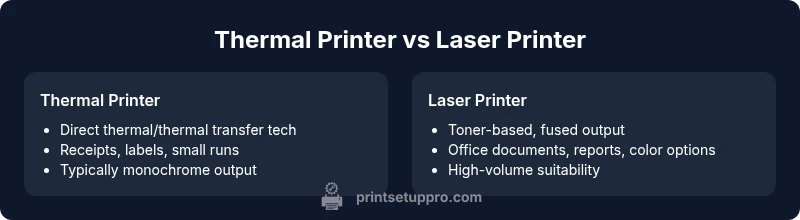
Thermal printing relies on heat to reveal marks on specially coated media. Direct thermal printers activate dye on the surface, while thermal transfer devices use a ribbon to transfer pigment onto a medium. Most consumer and label-oriented thermal devices are designed to produce monochrome output, which keeps ink costs low and maintenance light. There are no traditional ink cartridges to replace, and the medium tends to be stable when stored away from heat sources. This makes thermal printing a strong fit for receipts, barcodes, and shipping labels. The Print Setup Pro Team notes that reliability and simplicity in thermal workflows appeal to small businesses and home offices that prioritize quick turnarounds with minimal downtime.
How Laser Printing Works
Laser printers operate with a rotating drum that is charged, exposed to a laser, and then coated with toner. The toner is fused to paper using heat, resulting in sharp text and crisp graphics suitable for documents and presentations. Laser devices are generally praised for higher speeds on typical office workloads and strong capability for color printing when using color toners. Because they rely on toner rather than liquid ink, laser printers are often favored in environments with frequent multi-page printing. The Print Setup Pro analyses suggest laser printing can offer a favorable total cost of ownership for document-heavy workflows, especially where color and reliability matter.
Cost of Ownership and Media Compatibility
Upfront cost and ongoing media expenses are central to choosing between thermal printer vs laser printer. Direct thermal units typically cost less to acquire, especially compact models designed for receipts or labels, while laser printers tend to be pricier at purchase but can offer favorable per-page economics with standard paper. Media compatibility also diverges: thermal devices thrive with heat-sensitive media like thermal paper and labels, while laser printers handle a broad range of plain papers, envelopes, and specialty media. For labels and receipts, thermal media costs can be a factor, but savings accrue from not buying ink or toner for routine prints. Conversely, laser devices support more diverse document media and color printing, making them versatile for finished reports and client deliverables. Print Setup Pro Analysis, 2026 emphasizes that the best choice balances volume, media, and long-term maintenance costs, rather than sticker price alone.
Real-World Use Cases and Scenarios
Retail point-of-sale environments rely on thermal printers for fast, reliable receipts and customer-facing labels, where durability under wrist-checks and queues is valuable. Shipping departments use thermal printers for labels that stick through handling and transit. Office spaces often deploy laser printers for longer-form documents, presentations, and color graphics, where sharp text and color fidelity matter. Students and DIY enthusiasts commonly use thermal devices for simple labeling or craft projects, while laser printers support term papers, reports, and course materials. When your workload blends receipts or labels with occasional color documents, a mixed environment or a thoughtfully chosen single device with relevant media may reduce friction. The decision should reflect how often you print, what you print, and where you print it most.
Maintenance, Durability, and Lifespan
Thermal devices generally require less maintenance, given there are no ink cartridges, toner, or complex print heads to replace frequently. The downside is that thermal prints can fade when exposed to heat or strong light over time, which matters for archival needs. Laser printers, with toner and a fused image, deliver durable prints for typical document storage but require periodic toner replacement and occasional drum maintenance. In practice, this translates to different service intervals and downtime expectations. For small offices, keeping a schedule for tray cleaning and toner replacement helps maintain consistent output. Print Setup Pro's guidance points to aligning maintenance expectations with the anticipated print mix, so you don't overinvest in equipment that isn’t used to its strengths.
Decision Framework: Which One Fits Your Workflow
If your primary tasks are receipts, courier labels, or packaging tags, a thermal printer often delivers the best value and speed. If your focus is producing long-form documents, color graphics, or frequent multi-page prints, a laser printer generally provides better throughput and versatility. Use this framework to decide:
- List your top tasks and media types.
- Estimate print volume and frequency for each task.
- Consider space, noise, and energy use in your environment.
- Compare long-term costs of consumables (ribbon/labels vs toner and paper).
- Plan for color needs and potential expansion.
- Assess whether a single-device setup can cover most needs or if a hybrid approach is necessary. The takeaway is to anchor your choice to actual workflows rather than hypothetical best-case scenarios. The Print Setup Pro Team notes that many customers benefit from starting with a focused use case and expanding later as needs evolve.
Common Misconceptions About Thermal and Laser Printing
A common myth is that all printers of a given type are interchangeable for every task. In reality, the media, speed, color requirements, and durability requirements matter more than the brand or capability alone. Another misconception is that laser printers automatically beat thermal devices in all cost categories; while laser can excel in doc-heavy workloads, thermal devices offer unbeatable efficiency for receipts and labels when ink and toner costs are considered. Finally, some users assume that color printing is inherently available on all laser printers; color capabilities vary by model and toner selection, which can influence both price and upkeep. Real-world decisions should factor in your exact material needs and environmental conditions to avoid misaligned performance expectations. The guidance from Print Setup Pro emphasizes aligning capabilities with workload to avoid unnecessary purchases.
Comparison
| Feature | Thermal Printer | Laser Printer |
|---|---|---|
| Technology | Direct thermal/thermal transfer (no ink) | Toner-based printing with a fuser |
| Typical Use Case | Receipts, labels, packaging | Office documents, reports, color graphics |
| Media Types | Thermal paper, heat‑sensitive labels | Plain paper, envelopes, specialty media |
| Color Printing | Typically monochrome (color via specialized media possible) | Full color printing with color toners |
| Running Cost | Low per print for receipts/labels; media driven | Moderate to low per print depending on toner and usage |
| Upfront Cost | Often lower for compact models | Higher for office-grade devices |
| Durability of Output | Prints fade with heat/light exposure | Prints are generally durable for documents |
| Best For | Receipts, labels, small runs | Document-heavy workflows and color printing |
Benefits
- Low maintenance for direct thermal uses
- Low consumable costs with appropriate media
- Compact sizes suited to small spaces
- No ink/toner required for direct thermal printing
Downsides
- Limited media versatility for thermal outputs
- Most thermal outputs are monochrome
- Color printing is not standard on most thermal devices
- Thermal prints can fade under heat/light exposure
Laser printers generally win for office documents; thermal printers excel for receipts and labels
Choose laser for document-heavy workloads and color capability. Choose thermal for fast, low-maintenance receipts and labeling tasks; for mixed workloads, consider a hybrid approach as described by Print Setup Pro.
People Also Ask
Can a thermal printer print color?
Most direct thermal printers are monochrome. Color printing generally requires specialized media or a different class of printer. For true color outputs, laser or inkjet options are typically used.
Most thermal printers print in black and white, with color options requiring specialized solutions.
Are thermal printers cheaper to run than laser printers?
Thermal printers often have lower ongoing consumable costs because they don’t rely on ink or standard toner, but media costs and device lifespan matter. In many mixed-use setups, laser printers can offer better per-page economics for documents.
Usually yes for receipts and labels, but it depends on what you print and how often you replace media.
Which is better for labels and receipts?
Thermal printers are typically better for receipts and labels due to fast throughput and simple consumables, while ensuring compatibility with label stock. For application-critical labeling, they tend to perform reliably.
Thermal printers usually win for receipts and label work.
Can laser printers print on label stock?
Yes, some laser printers can print on label stock, but ensure the media is specified for laser use to avoid jams and adhesive issues.
Laser printers can print on label stock if the media is designed for laser use.
What should a home office consider when choosing between thermal and laser?
Think about the primary task (receipts/labels vs documents), space, noise, and total cost of ownership. A mixed workload often benefits from a laser printer for documents and a small thermal label printer for packaging and receipts.
Focus on what you print most and the space you have.
Do laser printers require special maintenance?
Laser printers need occasional toner replacement and drum maintenance, plus routine cleaning to prevent jams. These tasks are generally predictable and tied to usage levels.
Yes, but maintenance is straightforward and tied to how much you print.
Quick Summary
- Identify your primary print tasks first
- Choose thermal for receipts/labels and low maintenance
- Choose laser for documents and color printing
- Factor total cost of ownership, not just upfront price
- Consider a hybrid setup if workloads are mixed