Clothes Printer Setup & Troubleshooting Guide
Learn how to choose, set up, and troubleshoot a clothes printer for garment printing at home. This step-by-step guide covers DTG/DTF, inks, substrates, color management, curing, and safe operation with expert tips from Print Setup Pro.


By the end of this guide, you will be able to set up a clothes printer for garment printing, covering DTG/DTF options, inks, substrates, prepress, curing, and safe operation. Learn how to choose the right printer for your fabrics, prepare artwork with color management, run test prints, and scale production as volumes grow. This practical approach comes from Print Setup Pro.
What a clothes printer can do for you
Clothes printers enable home sewers, students, and small businesses to print designs directly onto fabric. They support DTG (direct-to-garment), DTF (direct-to-fabric via transfer film), and heat-transfer options. According to Print Setup Pro, the best outcomes start with clear goals: fabric types, production volume, and desired durability. This overview helps you set expectations for color vibrancy, washfastness, and print flexibility.
Direct-to-garment printing is praised for soft hand feel and durability on natural fibers like cotton. DTG works best when fabrics are pretreated and fonts are designed with edge-to-edge coverage in mind. DTF uses a transfer film and often delivers bolder colors on tricky fabrics, but requires additional steps and equipment. Heat transfer can be a budget-friendly alternative for small runs, though it may feel heavier on the garment and may not be as durable.
Note: Print Setup Pro also emphasizes testing on representative fabrics before committing to a full run to avoid surprises in wash performance.
Direct-to-Garment (DTG) vs Direct-to-Fabric (DTF) vs Heat Transfer
- DTG: Prints directly on the garment with special textile inks, producing soft hand feels and excellent color reproduction on cotton and light fabrics. Requires pretreatment for best results on light fabrics and washproof finishes.
- DTF: Uses a transfer film that is printed and then applied to fabric with heat; works on a wider range of fabrics, including blends and polyester, with strong color saturation. Usually adds an extra finishing step and film handling.
- Heat Transfer: Applies solids and designs via heat applied sheets; low upfront cost and simple setup, ideal for small runs or on demand designs. Durability varies with material and number of washes.
Prep: artwork, color management, and file formats
Artwork quality begins with high resolution raster art or vector designs. For most clothes printing, design at 300 dpi or vector based scalable assets to avoid pixelation. Use ICC color profiles and calibrate your monitor to match the printer output. Export in industry standard formats: PNG with transparency for DTG, or high quality PDF/SVG for vector logos. Prepare separate print layers for white underbase when required, and test colors on swatches before printing on garments. Print Setup Pro recommends confirming color separations and underbase settings before production.
Hardware and inks: choosing the right printer and inks
Your printer choice should reflect fabric types, budget, and production goals. DTG printers with white ink capability perform best on light colored cotton; DTF printers suit a broader range, including blends and synthetics. Inks matter: water based textile inks typically offer soft feel and washfastness; check that the ink system matches your printer model. Consider maintenance needs, availability of spare parts, and support. A good setup includes a reliable heat press or curing oven and compatible pretreatment solutions.
Substrates and care: fabrics, pretreatment, and curing
Choose fabrics based on finish and wash durability: 100 percent cotton yields vibrant colors with DTG when properly pretreated; polyester blends can be challenging and may benefit from DTF. Pretreatment improves adhesion on light fabrics, but requires precise spraying and curing. After printing, cure according to ink guidelines—temperature, time, and even pressure are critical to prevent cracking. Wash tests help verify durability.
Common issues and quick fixes
Color misalignment can stem from miscalibrated color profiles; re calibrate using a test chart. Ink not printing evenly may indicate clogged nozzles in DTG or poor transfer adhesion in DTF; perform nozzle checks and clean routines per your printer manual. Fabric bleed can occur on very absorbent fabrics if pretreatment is overdone. Always run test swatches and document your settings so you can reproduce results.
Tools & Materials
- Clothes printer (DTG/DTF) with textile inks(Ensure compatibility with water-based inks and garment fabrics)
- Textile inks compatible with your printer(White ink for light fabrics and color inks for vibrant designs)
- Heat press or curing oven(Even temperature distribution; check manufacturer guidance for times)
- Pretreatment supplies (DTG)(Needed for cotton fabrics to improve adhesion and vibrancy)
- Color management software(ICC profiles and calibration tools)
- Protective work surface and lint-free wipes(Keeps workspace clean and reduces defects)
Steps
Estimated time: 1.5-3 hours
- 1
Assess your printing goals
Define target fabrics, expected monthly volume, and durability requirements. This will determine whether DTG, DTF, or heat transfer is most cost-effective for your projects. Document your baseline and plan a scalable path for growth.
Tip: Create a simple worksheet that maps fabric types to ink systems and production times. - 2
Choose a printer and ink system
Evaluate the strengths and limits of DTG, DTF, and heat transfer printers. Check white ink capability, maintenance needs, and supported fabrics. Ensure warranty terms align with your expected usage.
Tip: Ask vendors for samples printed on your target fabrics to assess color and feel. - 3
Prepare artwork and color management
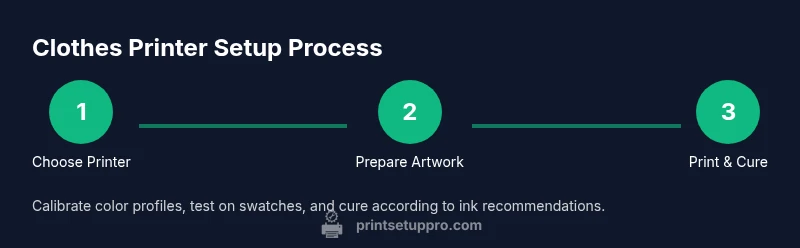
Design at 300 dpi or use vector assets. Set up color profiles that match your printer and ink. Create separate layers for white underbase if needed and export in compatible formats.
Tip: Always test with a small swatch before full production. - 4
Prepare fabrics and pretreatment
Prewash fabrics as recommended and lay them flat. Apply pretreatment evenly on white or light fabrics if using DTG, then cure lightly to fix the coating before printing.
Tip: Practice spraying and curing on a scrap fabric to dial in spray thickness. - 5
Run a test print and calibrate
Print a swatch, compare it to your target colors, and adjust ink density and profiles. Iterate until color alignment and grayscale accuracy meet your standard.
Tip: Keep a log of profiles and settings for future runs. - 6
Cure and finish
Apply heat according to ink guidelines, then allow garments to cool fully. Check for tack, washfastness, and any color transfer onto other fabrics during handling.
Tip: Perform a wash test on a sample before mass production. - 7
Evaluate and optimize workflow
Review print quality, production speed, and material usage. Update color profiles and workflow steps to reduce reprints and waste as volumes grow.
Tip: Keep a production diary to identify bottlenecks.
People Also Ask
What is the difference between DTG and DTF for clothes printing?
DTG prints directly on fabric using textile inks, delivering soft hand feel on cottons and similar fabrics. DTF uses a transfer film applied with heat, working well on a wider range of fabrics, including blends and synthetics.
DTG prints directly on fabric, while DTF uses a transfer film. Both have pros depending on fabric and design.
Do I need pretreatment for cotton fabrics?
Pretreatment improves ink adhesion and vibrancy on cotton, especially for DTG. It’s typically required on light fabrics to achieve solid color coverage.
Yes, pretreatment is usually needed for cotton with DTG to get strong colors and durability.
Can I print on polyester or blends with a clothes printer?
Yes, but results vary. DTF or specialized inks often yield better adhesion on polyester blends than standard DTG techniques.
You can print on polyester blends, but choose DTF or a printer designed for synthetic fabrics for best results.
What maintenance steps prevent clogs and poor prints?
Regular nozzle checks, cleaning cycles, and proper ink storage prevent clogs and color shifts. Follow your printer’s maintenance schedule faithfully.
Keep the nozzles clean and run occasional cleanings to prevent clogs.
What safety considerations should I follow?
Ventilate when using pretreatments, wear gloves when handling inks, and follow all ink safety data sheets.
Ventilate, wear gloves, and follow ink safety guidelines.
How long does a typical setup take?
Setup time varies with experience and equipment but plan for about 60 to 180 minutes for initial configuration and first prints.
It can take from an hour to several hours depending on your setup.
Watch Video
Quick Summary
- Choose a garment-friendly printer that matches fabrics.
- Manage color with ICC profiles and calibrated displays.
- Cure thoroughly to ensure durable washfastness.
- Test prints before production runs.
- Maintain the printer regularly to prevent clogs.